
Something happens outside your house. You open the app.
The clip is either there or it isn’t. That’s the only test that matters, and it’s exactly where PoE and WiFi security cameras differ most not in resolution or night vision or app design, but in whether the footage exists when you go looking for it.
PoE vs WiFi Security Cameras
Here’s the honest comparison, including the part most articles skip: WiFi wins outright for a large number of New Zealand homes, because a working WiFi camera beats a PoE system you can never actually install.
The short answer
PoE is more reliable, records continuously, and costs nothing to run once installed. WiFi is far easier to install and is often the only realistic option in an existing house. The deciding question is simple: can you get an Ethernet cable to the camera position? If yes, choose PoE. If no, choose WiFi and set it up well.
Everything below is detail on that one question.
What “PoE” and “WiFi” actually mean here
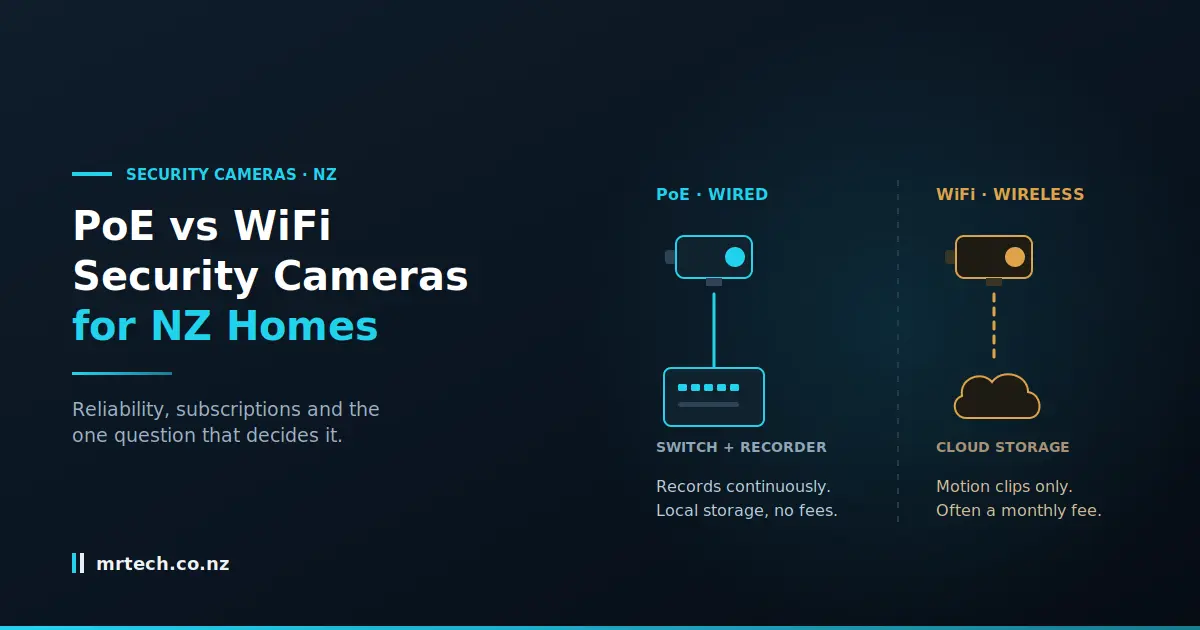
A PoE camera receives power and data through a single Ethernet cable from a switch. A WiFi camera sends its video over your wireless network but still needs power from somewhere, which is the detail most comparisons gloss over.
Understanding that changes how the install comparison looks.
“Wireless” cameras usually aren’t
Unless it’s battery-powered, a WiFi camera needs a power cable run to it. You haven’t eliminated cabling you’ve swapped a data cable for a power cable, and kept the harder part of the job.
That matters because Ethernet is easier to run than mains power in most situations. Low-voltage cable doesn’t need an electrician, doesn’t need a weatherproof outlet under the eaves, and can be terminated by anyone with a crimp tool.
So “wireless is easier to install” is only true if you already have a power point where you want the camera, or you’re using battery cameras.
Where the footage lives
This is the difference with the longest financial tail, and it belongs early rather than buried.
- PoE systems typically record to a local recorder or NVR sitting in your house. The footage is on a drive you own.
- WiFi cameras often record to the manufacturer’s cloud, frequently behind a monthly subscription, with limited or no local option.
One is a one-off purchase. The other is a purchase plus a bill, forever.
Reliability: the difference that actually shows up
PoE cameras drop out far less often. They don’t compete for airtime, don’t suffer from interference, and don’t vanish from the network when the router reboots at 3am. WiFi failures tend to be intermittent rather than total which is worse, because you don’t notice until the moment you need footage.
Reliability is the strongest argument for PoE, and it’s not close.
What congests a home WiFi network
Several things stack up in a typical NZ suburb:
- Neighbouring networks. In a townhouse or apartment you may be sharing channels with a dozen others.
- 2.4GHz crowding. Cameras often sit on 2.4GHz for range, which is the busiest band and shared with everything from baby monitors to Bluetooth.
- Distance and materials. Weatherboard is forgiving; brick, concrete block and foil-backed insulation are not. An external camera is on the far side of exactly the materials that block signal.
- Simultaneous streams. One camera is fine. Four cameras streaming while someone watches Netflix is a different situation.
The failure you don’t notice
Here’s the pattern worth guarding against: a camera that’s offline for a few hours each week. Not broken, not obviously faulty, just intermittently absent.
Nobody checks. There’s no alert you pay attention to. And then something happens during one of those windows.
Recording: continuous versus event-triggered
PoE systems with a local recorder usually record continuously, so everything is captured whether or not anything triggered detection. Most WiFi cameras record only on motion, which means the footage exists only if the camera decided something was worth saving.
That gap is where footage goes missing.
Why motion-only recording misses things
Three failure modes, all common:
- Trigger delay. The camera detects motion, wakes, and starts recording. The first second or two — often the useful part — is already gone.
- Detection zones. Set them too wide and you get alerts every time a car passes. Too narrow and someone walks up the side of the house unrecorded.
- No context. You get a 20-second clip instead of the ten minutes before and after, which is what you actually want when reconstructing what happened.
Continuous recording sidesteps all three. You scrub back to a timestamp and watch.
Bandwidth and 4K
Continuous 4K over WiFi is a lot to ask of a home network, especially with several cameras. Something has to give usually resolution, frame rate, or continuity.
A PoE camera has a dedicated cable to itself and doesn’t have to negotiate with anything. That’s why higher-resolution continuous recording is straightforward on PoE and awkward on WiFi.
Running costs: the subscription question
A PoE system recording locally has essentially no ongoing cost. Many WiFi cameras require a monthly cloud plan for anything beyond a few seconds of clip history. Over five years, the cheaper camera frequently ends up costing more.
Run the numbers before you buy into an ecosystem, not after.
A five-year cost comparison
The pattern is consistent even if the figures vary: a lower upfront price plus a recurring subscription overtakes a higher upfront price with local storage, usually within two to three years and the gap widens with every camera you add, because subscriptions are often per-camera or tiered by camera count.
What happens when the subscription lapses
Worth checking before you commit: some cameras stop recording entirely without an active plan, some drop to a very short clip history, and some make existing footage inaccessible.
Ask that question of any subscription-based system you’re considering. The answer tells you how much of the product you actually own.
Power outages, storms and your internet connection
This is where the New Zealand context changes the answer. A storm frequently takes out your power and your fibre together and that’s precisely when you’d want footage. A cloud-dependent camera loses both its power and its route to storage at the same moment.
A local PoE system on a UPS keeps recording through it.
Cloud storage needs internet you may not have
If your camera uploads to the cloud and your connection is down, there’s nowhere for the footage to go. Some cameras buffer to onboard storage and upload later; many don’t.
A local recorder doesn’t care about your internet connection at all. It writes to its own drive. You lose remote viewing until the connection returns, but you don’t lose the recording.
Putting the system on a UPS
Practical and often overlooked: a PoE switch and recorder are two devices in one place, so a single UPS keeps the whole camera system running through an outage.
Try doing that with six WiFi cameras on individual plug-pack adapters scattered around the house. Centralised power is a genuine architectural advantage, not a footnote.
Installation: where WiFi genuinely wins
In an existing house with no ceiling access, solid masonry walls, or a tenancy agreement, running Ethernet may simply not be an option. WiFi is the right answer for those homes, and a WiFi camera that’s installed and working beats a PoE system that stays in the box.
Anyone who tells you PoE is always the answer hasn’t tried to cable a mid-floor of a two-storey brick house.
When cable isn’t possible
Common NZ situations where WiFi wins on practicality:
- Mid-floor of a two-storey home with no accessible void above or below
- Brick, block or concrete construction where chasing a cable means real damage
- Rentals, where you can’t drill through cladding or make permanent changes
- Apartments and body corporate properties with rules about exterior alterations
- A single camera at the front door, where the effort of a cable run is out of proportion to the job
Battery cameras as a third option
Worth naming honestly: battery cameras are genuinely wire-free, which solves the installation problem completely.
The trade-offs are real. They record on events only, they need recharging every few months, cold and heavy activity shorten that considerably, and continuous recording is off the table. For a specific position where nothing else will work, they’re a reasonable answer. As a whole-house system, they’re a compromise.
PoE vs WiFi at a glance
| PoE cameras | WiFi cameras | |
|---|---|---|
| Installation | Needs Ethernet run to each camera | Needs power at each camera |
| Reliability | Very consistent | Variable, often intermittently |
| Recording mode | Usually continuous | Usually motion-triggered |
| Storage | Local recorder or NVR you own | Often cloud, sometimes local |
| Ongoing cost | Essentially none | Frequently a monthly subscription |
| During a power cut | Keeps recording on a UPS | Camera and cloud path both lost |
| Effect on home network | None — dedicated cable | Shares your wireless bandwidth |
| Continuous 4K | Straightforward | Demanding, often compromised |
| Adding more cameras | Add cable and switch ports | Adds load to the same network |
| Best for | Homes where cable is possible | Existing homes, rentals, single positions |
Which should you choose?
- New build or renovation → PoE, without hesitation. Cable while the walls are open.
- Existing single-storey with roof access → PoE is usually achievable through the ceiling void.
- Existing two-storey, no void access → WiFi for the upper level, PoE where you can reach.
- Rental → WiFi or battery. Nothing permanent.
- Apartment → WiFi, and check your body corporate rules first.
- One camera at the front door → WiFi is proportionate to the job.
- Four or more cameras → PoE. This is where WiFi congestion and subscription costs both start to bite.
- A property where footage genuinely matters — a business at home, a rural property, previous break-ins → PoE with local recording and a UPS.
Privacy and where your footage is stored
Both camera types capture identifiable people, and privacy obligations apply either way once footage extends past your boundary. Cloud recording adds a further question: where the footage is held, who can access it, and under whose jurisdiction.
Point cameras at your own property, use privacy masking where your gear supports it, and talk to your neighbours before mounting anything facing their way. If footage location matters to you, local recording gives you a definite answer that a cloud service may not.
Pros and cons
PoE — for:
- Consistent, dependable connection
- Continuous recording rather than clips
- Footage stored locally on hardware you own
- No subscription
- Centralised power, so a single UPS covers everything
- Scales cleanly — add cable and switch ports
PoE — against:
- Requires an Ethernet run to every camera, which is sometimes impossible
- Higher upfront cost
- Needs a switch with adequate PoE budget and somewhere to put a recorder
- Retrofitting an existing house can be disruptive or unachievable
- Not an option in most rentals
WiFi — for:
- Far quicker to install where power already exists
- The only realistic option in many existing homes and rentals
- Lower upfront cost
- Easy to reposition or take with you
- Battery models remove cabling entirely
WiFi — against:
- Intermittent dropouts you may not notice
- Usually motion-triggered rather than continuous
- Often locked to a subscription for useful footage history
- Loses both power and cloud access in an outage
- Consumes home network bandwidth, and gets worse with each camera added
- Still needs a power cable unless it’s battery-operated
FAQs
Are PoE cameras better than WiFi cameras?
For reliability, continuous recording and running cost, yes. For installation in an existing house, often no. The right answer depends entirely on whether you can get cable to the camera position.
Do WiFi security cameras work without internet?
Most need a connection to reach their cloud storage and to send you alerts. Some buffer to onboard storage and upload later, but many simply stop recording. A local PoE system keeps recording regardless of your internet.
Do PoE cameras need a separate power supply?
No, that’s the point. Power and data travel down one Ethernet cable from a PoE switch, so there’s no power outlet needed at the camera.
Can I add PoE cameras to a house that’s already built?
Often yes, via ceiling voids or under-floor spaces, particularly in single-storey homes. It’s harder on a two-storey mid-floor or in masonry construction, where WiFi may be the practical choice.
Do I need a monthly subscription for security cameras?
Not with a PoE system recording locally. Many WiFi cameras do require one for meaningful footage history, so check what happens without an active plan before you buy into a brand.
How many WiFi cameras can one router handle?
Fewer than the specification suggests, because the constraint is airtime and upload bandwidth rather than device count. Beyond two or three continuously streaming cameras, most home networks start to struggle.
Will my cameras keep recording in a power cut?
Only if they’re on backup power. A PoE switch and recorder can sit on one UPS and keep running. Individually powered WiFi cameras all stop, and their cloud path is usually gone too.
 No products in the cart.