
Someone two streets over had their garage cleaned out on a Tuesday afternoon. Now you are looking at cameras, and the range is bewildering $200 for a cloud camera at the hardware store, or well over a thousand for a recorder-based system online.
NVR vs Cloud Security Cameras
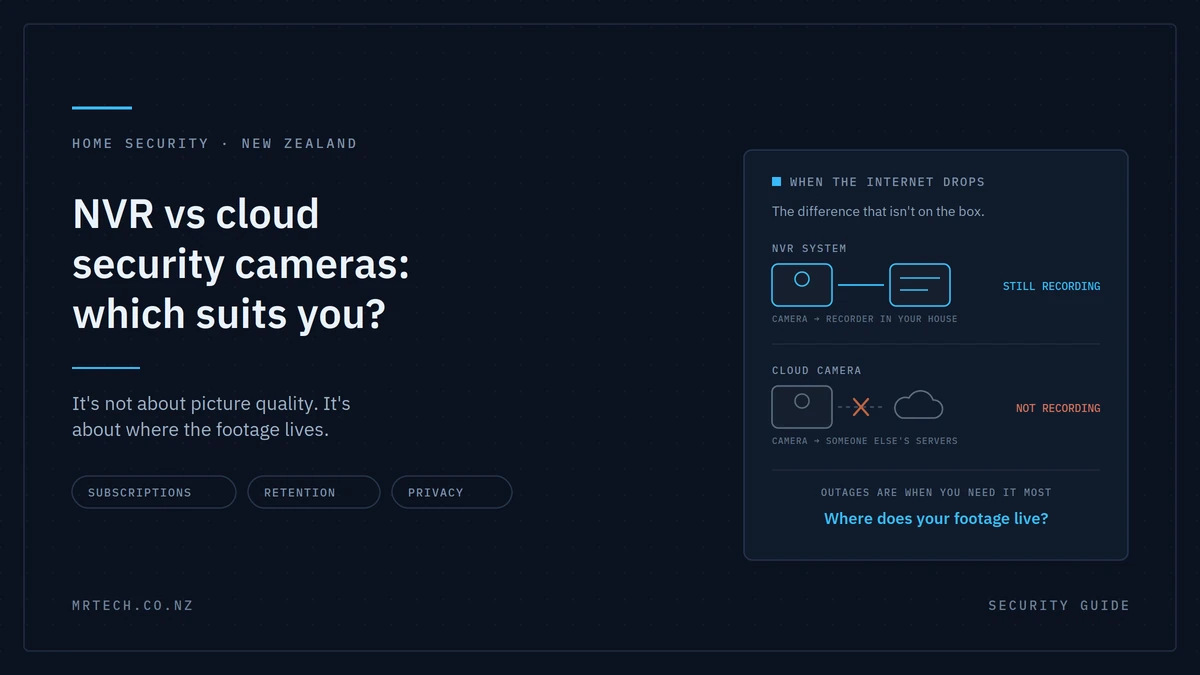
The NVR vs cloud security cameras question isn’t really about picture quality. Both are good enough now. It’s about where your footage lives on a drive in your house, or on somebody else’s servers and every other difference follows from that one choice.
The short answer
Choose an NVR system if you want continuous recording you own, keep for months, and that carries on working when your internet drops. Choose cloud cameras if you want cheap, simple coverage of one or two spots and don’t mind a monthly bill.
The two deciding factors are what happens during an internet outage, and whether you want an ongoing subscription.
The difference is where the footage goes
Everything else in this comparison is a consequence of this.
How an NVR system works
Cameras are wired back to a network video recorder sitting in your house usually a cupboard, garage or hallway. Footage records to a hard drive inside that recorder. You view it locally on a screen, or remotely through an app that connects back to your own hardware.
The recordings are on a drive you own, in a building you control.
How cloud cameras work
The camera connects to your Wi-Fi and uploads footage to the manufacturer’s servers. You view it through their app. How long recordings are kept depends on your subscription plan.
The recordings are on someone else’s infrastructure, retained under their terms.
Why that single difference drives everything else
Cost model, offline reliability, how long footage lasts, who can access or delete it, and how much of your internet connection it consumes all of it traces back to whether the footage stays in your house or leaves it.
What happens when the internet goes down
An NVR keeps recording. Most cloud cameras stop.
That’s the difference that changes people’s minds, and it’s rarely on the box.
Why this matters more than it sounds
Internet outages aren’t rare. Storms, line faults, a router that needs rebooting, a modem that dies at 2am — all normal. During any of those, a cloud camera has nowhere to send footage.
There’s also the deliberate case. Cutting or disabling a connection before entering a property is a known tactic, and a system that depends on that connection to record is a system with an obvious weakness.
An NVR doesn’t care. The cameras and recorder are on your own network, and they keep writing to the drive whether or not anything can reach the outside world.
The local storage exception
Many cloud cameras have a microSD slot as a fallback, which helps. Two honest caveats: card capacity is small, so retention is short, and SD cards in cameras recording continuously fail more often than people expect.
It’s a mitigation rather than a solution.
If your cameras drop out because of Wi-Fi coverage rather than internet outages, that’s a different problem our guide to fixing WiFi dead zones covers it.
The subscription maths nobody does
A cloud camera’s purchase price isn’t its cost. The number that matters is the purchase price plus the subscription, multiplied by how many cameras and how many years.
Very few people do that sum before buying, and it’s usually the deciding argument.
Run the numbers yourself
Cloud: camera cost × number of cameras, plus (monthly plan × 12 × years). Note whether the plan is per camera or covers multiple that changes the total substantially.
NVR: recorder + cameras + surveillance drive + cabling, plus electricity and an eventual drive replacement. No subscription.
Over one year, cloud usually looks cheaper. Over three to five years with several cameras, the position often reverses and an NVR keeps recording after that with no further outlay.
What happens if you stop paying
Retention drops to whatever the free tier offers, which is often a few seconds of event clips or nothing at all. Some features become unavailable.
Worth understanding: with a subscription model, you’re renting access to your own footage. Stop paying and the recordings from last month may simply not be there.
The honest NVR ongoing costs
Not zero. The recorder draws power continuously modest, but real. Surveillance drives are consumables and will eventually need replacing. And if a camera fails outside warranty, you buy a camera.
Still considerably less than a per-camera monthly fee over the same period.
The comparison, side by side
| NVR system | Cloud cameras | |
|---|---|---|
| Upfront cost | Higher | Lower |
| Ongoing cost | Power, eventual drive replacement | Monthly subscription per camera or plan |
| Records during internet outage | Yes | Usually no, unless a card is fitted |
| Typical retention | Weeks to months, your choice | Days to weeks, plan-dependent |
| Cameras supported | 4, 8, 16 or more | Practically limited by cost and bandwidth |
| Installation | Cable runs required | Plug in and pair |
| Who holds the footage | You | The manufacturer |
| Internet upload use | Minimal — only when viewing remotely | Continuous |
| Best for | Whole-property coverage, long retention | One or two spots, rentals, simplicity |
Retention: how long do you actually keep footage?
Cloud plans typically retain days to a few weeks. An NVR with a decent surveillance drive holds weeks to months, and you decide the balance between resolution and retention.
That difference matters more than most buyers expect at the point of purchase.
Why retention matters
You often don’t know you need footage until well after the event. Damage to a vehicle noticed a fortnight later. A pattern of someone walking the street at odd hours. An insurance claim that asks for footage from a date you’d forgotten.
Short retention means the answer is “it’s gone.”
How much storage you need
It depends on camera count, resolution, frame rate, compression and whether you record continuously or on motion. As a rough guide, total bitrate in Mbps × 10.8 gives approximate GB per day — divide your drive capacity by that for days of retention.
Use a surveillance-rated drive rather than a desktop one. Recording continuously from multiple cameras is a workload desktop drives aren’t built for, and it’s the most common cause of premature failure in home systems.
Bandwidth and data: the New Zealand angle
Cloud cameras upload continuously, and residential connections are weakest exactly where that matters upload speed is typically a fraction of download on many plans.
What multiple cameras actually use
One camera streaming at moderate quality is manageable. Four high-resolution cameras uploading around the clock is a sustained load on your upload capacity, and it competes with video calls, backups and everything else going out of the house.
An NVR only uses your connection when you’re actively viewing remotely. The rest of the time the traffic stays entirely on your local network.
If you’re rural or on wireless broadband
This is where cloud becomes genuinely impractical. Data caps and limited upload on rural wireless plans don’t suit continuous uploading from several cameras. An NVR avoids the problem completely, because the footage never leaves the property unless you ask for it.
Privacy: where your footage lives matters
Two things worth knowing, and neither appears in most camera comparisons.
First, home cameras that capture beyond your own property a footpath, a shared driveway, a neighbour’s yard engage privacy obligations. Second, cloud storage means a third party holds your recordings, sometimes on servers outside New Zealand, under terms they set.
What NZ homeowners should know
If your cameras record people outside your property boundary, you have obligations around how that footage is collected, used and stored. The Office of the Privacy Commissioner publishes guidance for residential CCTV, and it’s worth ten minutes before you mount anything.
The practical difference between the two
With an NVR, the footage is on a drive in your house. Access is a physical question.
With cloud, the footage is on a company’s servers, possibly offshore, governed by their privacy policy and terms which can change. Your access depends on your account being in good standing and the service continuing to exist.
Neither is wrong. But if the recordings include your family, your visitors and your neighbours, it’s worth knowing which one you’re choosing.
Neither is a free pass
Aim cameras at your own property as far as practical, avoid pointing them into neighbours’ windows or private spaces, consider signage, and be reasonable about what you record. That applies whichever system you buy.
Installation: what each actually involves
Cloud cameras plug in and pair with an app. NVR systems need cable runs and that’s the single biggest reason people choose cloud.
The PoE advantage
Power over Ethernet sends power and data down one Cat6 cable, so a camera can go under an eave with no power point nearby and no electrician for the power side. One cable per camera rather than two.
Whether you need a PoE switch or just an injector depends on camera count our guide to PoE switches covers that decision.
When cabling is easier than expected
Most standalone New Zealand homes have accessible roof space, which makes running cable to eave-mounted cameras more straightforward than people assume. Older homes on piles often have a workable subfloor too.
Two-storey, concrete or fully insulated construction is where it gets harder.
When cloud genuinely wins
- Rentals, where you can’t drill
- Apartments, same reason
- Brick or concrete construction with no cavity
- A single doorbell camera an NVR is overkill for one entry point
- Temporary coverage while you plan something permanent
The setup most NZ homes should actually have
For a standalone home you own: an NVR with PoE cameras covering the property, plus one cloud or doorbell camera at the front door.
The NVR gives you continuous recording that survives outages, long retention and footage you own. The doorbell gives you the instant phone notification and two-way audio that’s genuinely convenient day to day. Together they cover both needs, and the doorbell’s subscription if you even take one is a single small fee rather than one per camera.
That combination costs more upfront than cloud alone and less over five years than four cloud cameras on plans.
FAQs
Do NVR cameras work without internet?
Yes. The cameras and recorder sit on your local network, so recording continues normally during an internet outage. You’ll lose remote viewing until the connection returns, but nothing stops being recorded.
Are cloud security cameras worth the subscription?
For one or two cameras, often yes the simplicity is genuine and the monthly cost is small. For four or more, the maths usually favours an NVR within a few years, and you keep the footage rather than renting access to it.
How long does an NVR keep footage?
As long as your drive allows, and you set the balance. Weeks to months is typical for a home system with a surveillance-rated drive. When the drive fills, it overwrites the oldest footage automatically.
Can someone else access my cloud camera footage?
Your recordings sit on the provider’s servers under their terms, so access depends on their systems and policies. Use a strong unique password and app-based two-factor authentication. With an NVR, the footage is physically in your house, which is a different risk profile.
Do I need an electrician to install security cameras?
Not for PoE cameras, which take power over the network cable data cabling isn’t prescribed electrical work in New Zealand. You would need one if you’re adding power points or doing any mains wiring.
How much internet data do cloud cameras use?
More than most people expect, since they upload continuously. Several high-resolution cameras place a sustained load on upload capacity, which is the weaker direction on most residential plans. If you’re rural or capped, this is a significant consideration.
Is it legal to record my neighbour’s property in NZ?
Cameras capturing beyond your boundary engage privacy obligations around collection, use and storage. Aim cameras at your own property where practical and check the Privacy Commissioner’s guidance on residential CCTV before installing.
 No products in the cart.