
Two cameras to install under the eaves. In the cart: a $28 PoE injector and a $243 eight-port PoE switch. Both will technically do the job, and nothing on either product page tells you which one is right for your situation.
Do You Need a PoE Switch for Your Home Network?
Here’s the rule that answers it most of the time: count your powered devices. One or two, buy injectors. Three or more, buy a PoE switch. Whether you need a PoE switch for your home network really comes down to that, plus one spec power budget that catches out more buyers than anything else in home networking.
The short answer: count your powered devices
One or two PoE devices, injectors are cheaper, simpler, and completely adequate. Three or more, a switch is tidier, easier to troubleshoot and usually cheaper per device. Beyond that, the decision is about total power budget and whether you want per-port management.
That’s the whole framework. Everything below is detail on top of it.
What PoE actually does for a home network
Power over Ethernet carries power and data down the same cable, so a device can be installed where there’s no power point a ceiling, an eave, a fence line. No electrician for the power side, no adapter dangling off a bracket.
It’s the reason ceiling-mounted access points are practical in a house that was never wired for them.
Where that matters in a real house
- Access points on ceilings or high on hallway walls exactly where they perform best, and exactly where there’s never a socket
- Cameras under eaves and soffits outdoors, high up, nowhere near power
- Video doorbells and gate intercoms often at the far end of a driveway
- Access control readers same problem, same solution
What it means for installation
One cable per device instead of two. That’s less work, fewer holes, and no requirement for a registered electrician to add a power point at every camera location which on a multi-camera install is a meaningful saving.
If you’re weighing the injector-versus-switch question specifically, our comparison of PoE switches and injectors covers that head to head. This article is about whether you need one at all, and what size.
The rule of three
Three powered devices is roughly where a switch overtakes injectors on cost, tidiness and sanity. Below that, injectors win on simplicity. Above it, injectors start creating problems of their own.
One or two devices: buy injectors
A single access point does not need a $243 switch. An injector is cheap, it plugs into your existing router or switch, and if it fails you replace a $28 part rather than diagnosing a networking device.
We’d rather tell you that than sell you a switch you don’t need.
Three or more: buy a switch
The case flips quickly:
- One device to manage instead of three or four scattered around the house
- One power point rather than one per injector
- Per-port control — power-cycle a frozen camera without crawling behind furniture
- Cheaper per device once you’re past two or three
- Somewhere obvious to look when something stops working
Where injectors stop making sense
Four injectors means four power points consumed, four small boxes hidden behind furniture, and four things that can quietly fail. When one camera drops offline, you’re checking four separate points instead of glancing at a single row of port lights.
Power budget: the spec that catches people out
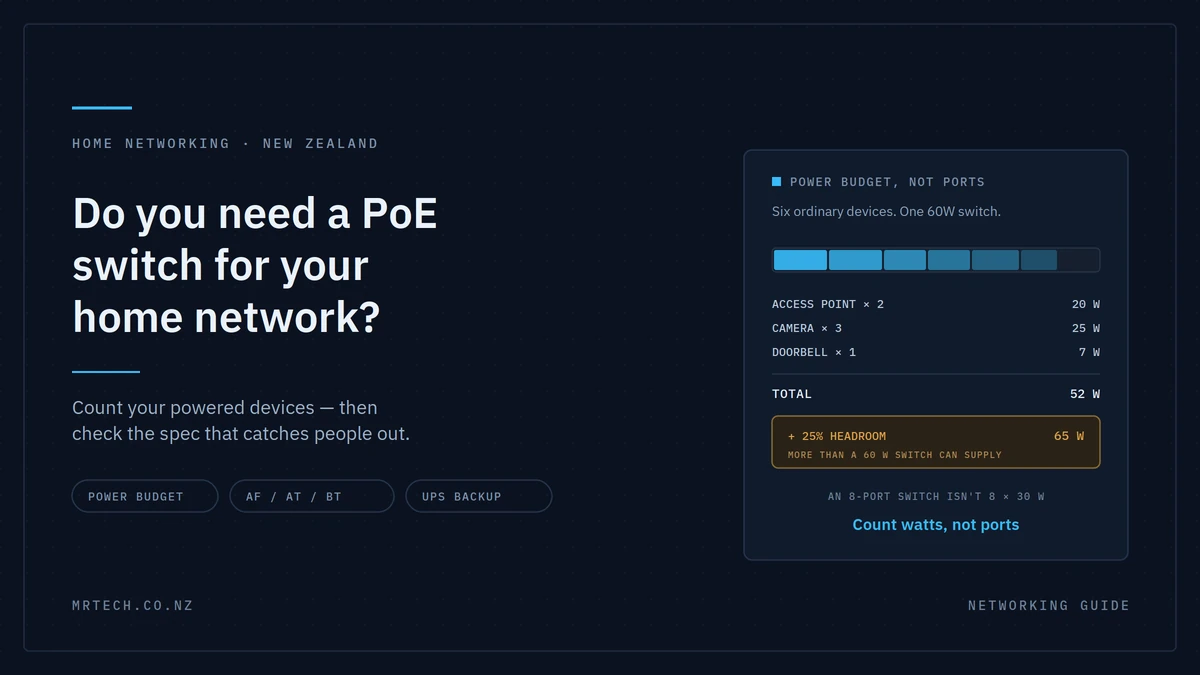
This is the section that saves you a return. A PoE switch has a total power budget shared across all its PoE ports, and it’s usually much lower than ports × maximum per-port wattage.
An eight-port switch with a 60W budget cannot deliver 30W to all eight ports. It can deliver 60W in total, however you divide it.
How to do the maths
- List every device you plan to power now, plus anything you’ll add in the next couple of years.
- Find each device’s actual draw from its datasheet not the maximum the standard allows.
- Add them up.
- Add 20–30% headroom for startup surges and future devices.
- Compare that to the switch’s total budget, not its port count.
A worked example for a fairly typical home:
| Device | Typical draw | Running total |
|---|---|---|
| Wi-Fi access point (indoor) | ~7–12W | 12W |
| Second access point | ~7–12W | 24W |
| Bullet camera | ~5–9W | 33W |
| Bullet camera | ~5–9W | 42W |
| Turret camera with IR | ~6–10W | 52W |
| Video doorbell | ~5–8W | 60W |
Six devices and a 60W budget is already at the limit before headroom. Add a PTZ camera which can draw considerably more and you’re over. That’s how a switch like the US-8-60W ends up being the right choice for three or four devices and the wrong one for seven.
Figures above are typical ranges. Check your specific model’s datasheet, because draw varies substantially between devices that look similar.
What happens when you exceed it
The switch doesn’t display a helpful error. It sheds load usually shutting down the highest-numbered ports first, or whichever has the lowest priority.
What you actually see is one camera that keeps dropping offline, or a device that reboots every few minutes for no obvious reason. People spend a weekend replacing cables and swapping cameras before realising the switch is simply out of power. If several devices behave strangely at once, check your budget before you check anything else.
PoE standards: af, at and bt
Three standards deliver very different amounts of power down identical-looking cable. Your switch has to support what your device needs the plug fitting proves nothing.
| Standard | Also called | Power at the port | Typical devices |
|---|---|---|---|
| 802.3af | PoE | Up to ~15.4W | Most indoor APs, basic cameras, VoIP phones |
| 802.3at | PoE+ | Up to ~30W | PTZ cameras, higher-power APs, cameras with heaters |
| 802.3bt | PoE++ | Up to ~60–90W | High-power APs, pan-tilt-zoom units, some displays |
Note that power delivered at the port is higher than power available at the device some is lost in the cable, and more over longer runs.
Why a mismatch looks like a broken device
Plug an 802.3at device into an af-only port and one of two things happens: it doesn’t power on at all, or it boots and then drops when it tries to draw more than the port can supply.
Neither looks like a power problem. It looks like a faulty camera. Working hardware gets returned over this regularly, so check the standard before you assume the device is dead.
Passive PoE: check before you plug
Some older and budget gear uses passive PoE, which pushes voltage down the cable without the negotiation that standards-compliant PoE uses. Mixing passive devices and standards-compliant switches needs checking first in the worst case you can damage equipment.
If the product page doesn’t say 802.3af, at or bt explicitly, find out what it does say before connecting it.
The argument nobody makes: one UPS protects everything
Here’s the benefit that rarely appears in PoE articles and matters a lot in New Zealand. Because your cameras and access points draw power from the switch, a single UPS on the switch keeps the entire system running through an outage.
Think about what that changes. A security system that stops recording the moment the power cuts has an obvious weakness and storms, which cause outages, are exactly when you’d most want it working. With injectors you’d need a UPS at every device to achieve the same thing, which nobody does.
One UPS, one power point, everything stays up. If you’re also running your router and modem from it, your internet connection survives too.
Size the UPS on the total draw of the switch plus its powered devices, and remember that runtime depends heavily on load a lightly loaded UPS lasts considerably longer than a fully loaded one. We’d rather quote you a realistic figure for your setup than a headline number.
Managed or unmanaged?
Unmanaged switches work the moment you plug them in and suit most homes. Managed switches add VLANs, per-port control and monitoring, which is worth paying for if you want cameras and IoT devices isolated from the network your laptop is on.
When management earns its price
- Segmenting cameras and IoT onto their own VLAN, away from personal devices
- Remotely power-cycling a frozen camera from an app instead of a ladder
- Seeing per-port power draw, which makes budget problems obvious immediately
- Small business setups where guest and staff traffic need separating
When it doesn’t
Two access points and a couple of cameras on a home network with no segmentation plan. Unmanaged does that job perfectly, and the money is better spent on a switch with more power budget headroom.
| PoE injector | Unmanaged PoE switch | Managed PoE switch | |
|---|---|---|---|
| Approx. NZ cost | ~$28 each | ~$240+ | ~$450+ |
| Setup effort | Plug in, done | Plug in, done | Some configuration |
| Best device count | 1–2 | 3–8 | 4+ with segmentation needs |
| Key capability | Cheapest entry | One device, one power point | VLANs, per-port control, monitoring |
| Drawback | Clutter beyond two | No per-port visibility | Costs more, needs setup |
Practical things people get wrong
- Cable category and length. Cat5e is the practical minimum; Cat6 is a sensible default. The 100m limit covers the whole run including patch leads at both ends, and PoE performs worse near that limit.
- Heat in an enclosed cabinet. PoE switches generate real heat under load. A sealed cupboard shortens their life.
- Fan noise. Higher-power switches have fans. If the switch lives in a hallway cupboard next to a bedroom, check whether the model is fanless.
- Uplink speed. Several high-resolution cameras recording continuously can saturate a single gigabit uplink. Worth a thought on larger installs.
- No spare ports. Buy for the devices you’ll have in two years, not the ones you’re installing this weekend. Adding a second switch later is the expensive way to get one more port.
Which size switch for which setup
Three realistic scenarios, using the maths from earlier.
A two-access-point house. Two indoor APs at roughly 10W each around 20W total, 26W with headroom. Injectors are perfectly reasonable here, though a small switch tidies it up and leaves room to grow.
A camera-and-AP house. Two APs and four cameras, roughly 50–60W before headroom. This is where a 60W-class switch is right at its limit worth stepping up to more budget so you’re not re-buying when you add a doorbell.
A small business or large property. Eight or more devices, some needing 802.3at, VLAN segmentation between staff and guest traffic. A larger managed switch with substantial budget headroom, and a UPS on it.
If you’re not sure which bracket you’re in, the networking range at Mr Tech covers all three, and we’re happy to run the numbers with you first.
FAQs
Do I need a PoE switch for one camera?
No. A single PoE injector is cheaper and does the same job. Injectors make sense up to about two devices; past three, a switch becomes tidier and usually cheaper per device.
What is a PoE power budget and how do I calculate it?
It’s the total wattage a switch can supply across all its PoE ports combined not per port. Add up the actual draw of every device you’ll connect, add 20–30% headroom, and check that against the switch’s total budget rather than its port count.
What’s the difference between 802.3af, at and bt?
They’re PoE standards delivering different power levels: af up to about 15.4W at the port, at up to about 30W, and bt substantially more. Your switch must support the standard your device requires, or the device may not power on at all.
Can I use a normal switch with a PoE injector?
Yes. An injector adds power to the cable between a non-PoE switch and the device, which is exactly why injectors are the sensible choice for one or two devices on an existing network.
Will a PoE switch work with any camera or access point?
Only if the device supports the same PoE standard the switch provides, and the switch has budget left to power it. Check both before buying, and be careful with older gear using passive PoE, which isn’t standards-compliant.
Do PoE switches need special cable?
No special cable, but use at least Cat5e Cat6 is a sensible default and stay within the 100m total run including patch leads. Cheap or damaged cable causes intermittent power problems that are hard to diagnose.
How many devices can a PoE switch power?
It depends on total budget rather than port count. A 60W switch might power six modest devices or only two high-draw ones. Always do the wattage maths rather than counting ports.
 No products in the cart.