
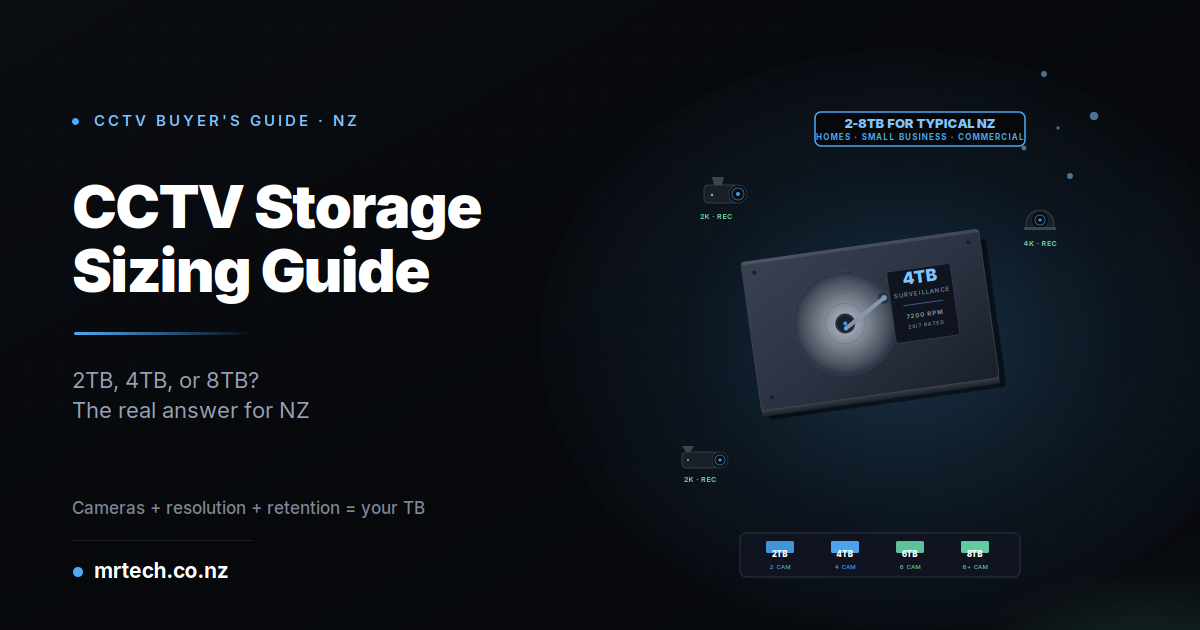
Your CCTV system needs a hard drive. The NVR spec sheet lists options from 1TB to 16TB, with prices ranging from $80 to $600+. Get it wrong and you either waste money on capacity you’ll never use OR run out of space and lose footage right when you actually need it.
How much storage do I need for CCTV in NZ
This guide gives you how much storage do I need for CCTV in NZ as a practical answer, not a formula-heavy technical dodge. Cameras + resolution + retention days = the specific TB size you need to buy. We’ll walk through the calculation, give you real recommendations for typical NZ setups, and cover the surveillance-grade hard drive question (spoiler: never use a standard desktop drive in an NVR). By the end, you’ll know exactly what to buy.
The 30-second answer most NZ homes need 2-4TB, most small businesses need 4-8TB
For typical NZ home setups (2-4 cameras, 2K resolution, 14-day retention): budget 2-4TB.
For small business setups (4-8 cameras, 4K resolution, 30-day retention): budget 4-8TB.
For larger commercial deployments (12+ cameras, extended retention): 8-16TB or NAS-based storage.
These recommendations assume H.265 encoding and motion-triggered recording — the modern standard on any NVR sold in NZ in 2026. Older systems using H.264 and continuous recording need roughly double this capacity for the same retention.
The storage calculation what actually drives your requirement
Four variables determine your CCTV storage needs: number of cameras, resolution (2K vs 4K), frame rate (15fps vs 30fps), and retention days (7 vs 14 vs 30). Modern H.265 encoding roughly halves storage vs older H.264. Motion-triggered recording reduces requirements 40-70% vs continuous recording. Understanding each variable helps you make informed trade-offs rather than just buying the biggest drive available.
Number of cameras the biggest multiplier
Each camera generates its own footage stream. Double the cameras, double the storage. This is the single biggest driver of your storage requirement a 2-camera setup needs half the storage of a 4-camera setup at the same resolution and retention.
Resolution 2K vs 4K storage impact
4K uses roughly 2x the storage of 2K for the same recording duration. If your cameras don’t need the extra detail (most residential cameras don’t), 2K resolution genuinely saves significant storage and lets you either extend retention or buy smaller drives.
Frame rate 15fps is usually enough
Most CCTV footage doesn’t need cinema-grade frame rates. 15fps is standard for surveillance and captures everything you need for identification and event review. 30fps doubles storage requirements without meaningfully improving security value. Only use 30fps if you specifically need smooth motion for license plate reading or fast-moving subjects.
Retention days how far back do you actually need to review?
14 days retention covers most residential scenarios enough time to notice, investigate, and export any incident. 30 days retention is standard for small business. Longer retention increases storage linearly (30-day retention needs 2x the storage of 15-day). Don’t retain more than you actually need.
H.265 vs H.264 modern encoding cuts storage in half
Any NVR sold in NZ in 2026 should support H.265 (also called HEVC) encoding. H.265 delivers roughly 50% file size reduction vs older H.264 at the same quality. If you’re comparing NVRs, H.265 support is genuinely non-negotiable the storage savings are dramatic.
Motion-triggered vs continuous recording the biggest savings lever
Continuous recording captures everything 24/7. Motion-triggered recording captures only when the camera detects movement. In typical residential scenarios, motion-triggered recording reduces storage by 60-80% because most cameras aren’t actually seeing motion most of the time (empty driveways, quiet backyards, closed offices).
For most NZ home and small business setups, motion-triggered recording is the correct default. Only use continuous recording where you genuinely need every second (high-value retail floor, cash handling areas, workplace safety monitoring).
NZ storage requirements by system size
Practical storage recommendations for realistic NZ CCTV setups:
| System Type | Cameras | Resolution | Retention | Recommended Storage |
|---|---|---|---|---|
| Small home (front door + driveway) | 2 | 2K | 14 days | 2TB |
| Standard home (perimeter coverage) | 4 | 2K | 14 days | 4TB |
| Large home (full property) | 6-8 | 2K or 4K | 30 days | 4-6TB |
| Small business (retail/office) | 4-6 | 4K | 30 days | 4-6TB |
| Medium business (multi-zone) | 8-12 | 4K | 30 days | 8-12TB |
| Large commercial | 12+ | 4K | 30-90 days | 12-16TB+ or NAS |
All recommendations assume H.265 encoding, motion-triggered recording, and 15fps. Continuous recording or 30fps roughly doubles these requirements. Add 20-30% buffer if your cameras will see high motion activity (busy retail, main road frontage).
Real-world storage calculator the practical formula
The rough calculation: Cameras × daily storage per camera × retention days = total storage. Typical daily storage per camera: 15-25GB for 2K H.265 with motion recording; 30-50GB for 4K H.265 with motion recording. Multiply, round up 20% for safety margin, that’s your target hard drive size.
Worked example 1 -4 cameras, 2K, 14 days
4 cameras × 20GB per camera per day × 14 days = 1,120GB = 1.12TB
Round up 20% for safety margin: ~1.35TB
Round to available drive size: 2TB drive
A typical NZ standard home setup front door, driveway, back garden, side path. 2TB handles it comfortably with buffer for high-activity days.
Worked example 2 — 6 cameras, 4K, 30 days
6 cameras × 40GB per camera per day × 30 days = 7,200GB = 7.2TB
Round up 20% for safety margin: ~8.6TB
Round to available drive size: 8TB or 10TB drive
Typical NZ small business setup retail floor, storeroom, customer entrance, staff entrance, cash area, external. 8TB is the tight fit; 10TB gives comfortable buffer.
Worked example 3 — 8 cameras mixed 2K + 4K, 30 days
4 × 2K cameras × 20GB × 30 days = 2,400GB 4 × 4K cameras × 40GB × 30 days = 4,800GB Total: 7,200GB = 7.2TB
Round up 20%: ~8.6TB
Round to available drive size: 8TB or 10TB drive
A common medium-business hybrid setup 4K cameras where identification matters (entries, cash areas), 2K cameras where general coverage is enough (aisles, back-of-house).
Local storage (HDD/NVR) vs cloud storage which is right for NZ buyers?
Local storage (hard drive in NVR) is one-time cost, no monthly fees, works during internet outages. Cloud storage is monthly subscription, requires reliable internet, but accessible from anywhere. Most NZ buyers benefit from local storage as primary + limited cloud for critical event backup the hybrid approach.
Local storage: pros and cons
Pros: one-time cost, no ongoing fees, works offline, full retention control, no bandwidth impact, no third-party data access, better for high-frame-rate or long-retention setups.
Cons: hardware fails eventually (surveillance drives last 3-5 years typically), on-site theft means footage loss, requires proper power protection (UPS recommended), initial cost higher than starting cloud subscription.
Cloud storage: pros and cons
Pros: accessible from anywhere with internet, redundant off-site backup, no hardware failure risk, lower initial cost, automatic software updates, some smart features (facial recognition, alerts) work better with cloud processing.
Cons: ongoing monthly costs (often $10-40/month per camera), requires reliable internet upload bandwidth (rural NZ often struggles), stops working during outages, third-party has access to your footage, extended retention gets expensive fast.
Hybrid approach the practical NZ recommendation
Local NVR for primary 24/7 recording + cloud backup for critical events only. Store 30 days locally on your NVR, push motion-triggered “alert clips” to cloud for off-site backup. Best of both worlds without cloud’s monthly cost scaling issues.
Which hard drives to actually buy for NZ CCTV
Never use a standard desktop hard drive in an NVR. They aren’t designed for the 24/7 write-heavy workload CCTV requires and typically fail within 12-24 months. Buy surveillance-rated drives specifically: WD Purple, Seagate SkyHawk, or Toshiba S300. These handle continuous write workload and typically last 3-5+ years in NVR use.
WD Purple vs Seagate SkyHawk vs Toshiba S300
All three are purpose-built surveillance drives with similar warranties (3 years) and similar continuous-workload ratings. Practical differences:
- WD Purple — widest NZ retail availability, popular with professional installers, slightly premium pricing
- Seagate SkyHawk — competitive pricing, good performance, occasional stock variability in NZ
- Toshiba S300 — often best value at NZ retail, slightly less marketing profile but solid technical specs
Choose based on availability and pricing at your preferred NZ retailer. All three are legitimately good choices differences are marginal.
What NOT to buy for CCTV storage
- Standard desktop drives (WD Blue, Seagate Barracuda) — designed for occasional use, fail fast under 24/7 write workload
- SSD drives — expensive for the capacity, unnecessary for CCTV (mechanical drives are the correct technology)
- Refurbished or grey-market drives — warranty issues, unknown remaining lifespan
- Very cheap unknown-brand drives — quality unpredictable, no warranty support in NZ
NZ retail pricing landscape for surveillance drives
Rough pricing at NZ retailers (verify current pricing):
- 2TB WD Purple / SkyHawk / S300: NZD $150-$200
- 4TB: NZD $220-$300
- 6TB: NZD $320-$420
- 8TB: NZD $420-$550
- 10TB+: NZD $550-$800+
MrTech NZ stocks pre-configured NVRs with surveillance drives already installed often better value than buying NVR and drive separately, plus warranty coverage on the complete system.
NZ privacy considerations how long should you retain footage?
NZ has no legal minimum for CCTV footage retention in most residential/commercial scenarios, but the Privacy Act 2020 limits how long you can keep identifiable footage. Practical guideline: retain for as long as reasonably necessary for security purposes (typically 14-30 days for homes, 30-90 days for businesses), then automatic overwrite.
Longer retention requires documented business justification. This isn’t legal advice for specific commercial CCTV compliance questions, consult a NZ privacy lawyer or the Office of the Privacy Commissioner directly.
Practical retention recommendations by property type
- Residential: 14-30 days sufficient for most scenarios
- Retail/hospitality: 30-60 days standard
- Workplaces: 30-90 days for safety and incident review
- High-value commercial (banks, jewellery, cash handling): 90 days or longer with documented justification
The key principle: keep footage as long as it’s genuinely useful for security purposes, no longer. Continuous overwrite through NVR auto-loop settings handles this automatically once you’ve sized the drive correctly.
When your storage requirements shift planning for future growth
Storage requirements grow over time even in unchanged setups. Camera upgrades (2K → 4K), feature additions (facial recognition, license plate recognition), and regulatory changes (Privacy Act updates, workplace safety) all increase storage needs.
Buy 20-40% more capacity than your current calculation suggests. A 4-camera setup that calculates to 2TB today should be built on a 3-4TB drive to accommodate future 4K upgrades or extended retention needs. The marginal cost of larger drive capacity is small; the cost of replacing an NVR-integrated drive in 18 months is significant.
FAQs
How much storage do I need for 4 CCTV cameras?
For 4 cameras at 2K resolution with 14-day retention using H.265 and motion recording: 2-4TB is standard (2TB tight, 4TB comfortable). For 4 cameras at 4K resolution with 30-day retention: 4-6TB is standard. Buy the larger option if budget allows — future 4K upgrades or extended retention become significantly more feasible.
How long does 2TB last for CCTV recording?
Depends entirely on your setup. 4 cameras at 2K, motion recording: approximately 20-25 days. 4 cameras at 4K, motion recording: approximately 10-14 days. Continuous recording (any resolution): 40-70% shorter. Your actual retention will vary with how much motion your cameras actually see.
Do I need special hard drives for CCTV in NZ?
Yes — surveillance-rated drives are strongly recommended. WD Purple, Seagate SkyHawk, or Toshiba S300 are the three main options at NZ retailers. Standard desktop drives (WD Blue, Barracuda) will fail within 12-24 months under CCTV’s 24/7 write workload. The price difference is small; the reliability difference is significant.
Is cloud storage better than local storage for CCTV?
For most NZ buyers, no — local storage is typically the better primary option. Cloud subscriptions add ongoing monthly costs, require reliable internet, and stop working during outages. Local NVR storage with hard drive is one-time cost, works offline, and gives you full retention control. Consider cloud as a supplement for critical event backup, not as your primary storage.
How long can I legally keep CCTV footage in NZ?
NZ has no fixed maximum retention period, but the Privacy Act 2020 requires you keep footage only “as long as reasonably necessary” for the purpose you collected it. Practical guidelines: 14-30 days for homes, 30-90 days for businesses, longer only with documented justification (high-value commercial premises, safety incident review). For specific commercial compliance questions, consult a NZ privacy lawyer.
What happens when my CCTV storage fills up?
NVRs use automatic overwrite when the drive is full, oldest footage is automatically deleted to make room for new recording. This is why sizing matters: if you have 20-day retention worth of storage, you’ll always have the last 20 days available, but nothing older. Your NVR settings let you configure this behaviour if needed.
Can I use my desktop computer’s hard drive for CCTV?
Technically yes, practically no. Desktop drives aren’t designed for CCTV’s 24/7 continuous write workload. They typically fail within 12-24 months when used in NVR applications. The small savings vs surveillance-rated drives isn’t worth the reliability penalty. Use WD Purple, Seagate SkyHawk, or Toshiba S300 for any CCTV installation.

 No products in the cart.