
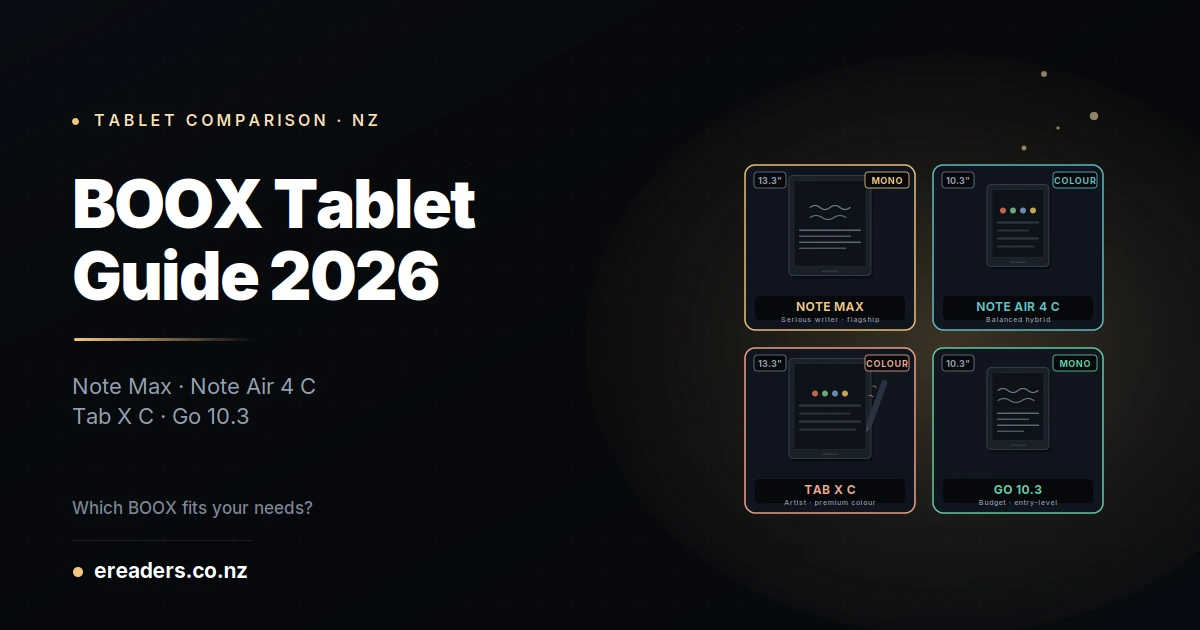
BOOX makes at least four flagship tablets that look almost identical from a distance but serve completely different buyers. Note Max, Note Air 4 C, Tab X C, Go 10.3 same brand, same operating system, wildly different price tags and use cases. Confusing enough that most first-time buyers order the wrong one and end up returning it.
BOOX tablet comparison NZ 2026
This BOOX tablet comparison NZ 2026 guide walks through all four models with real-world use cases, honest trade-offs, and a decision framework so you order the right tablet first time. No spec-sheet regurgitation, no marketing spin just the practical guidance NZ buyers need to spend $700-$2,000 confidently.
The 30-second answer which BOOX for which use case
Match your primary use case to the right tablet:
- Note Max — serious note-takers who want the largest E Ink writing surface (13.3″, mono)
- Note Air 4 C — readers and note-takers who want colour without going premium (10.3″, colour)
- Tab X C — artists and colour professionals who want the largest colour E Ink experience + haptic pen (13.3″, colour)
- Go 10.3 — budget-conscious writers wanting a capable note-taking tablet at the lowest price (10.3″, mono)
The four tablets at a glance
Quick specs comparison before diving into each:
| Model | Screen | Colour | Pen | RAM/Storage | Weight | Approx NZD | Best For |
|---|---|---|---|---|---|---|---|
| Note Max | 13.3″ | Mono E Ink | Pen Plus (EMR) | 6GB/128GB | ~615g | $1,600+ | Heavy writers, academics |
| Note Air 4 C | 10.3″ | Kaleido 3 Colour | Pen Plus (EMR) | 6GB/64GB | ~420g | $1,000+ | Mixed reader/writer |
| Tab X C | 13.3″ | Kaleido 3 Colour | InkSpire (Active + Haptic) | 12GB/256GB | ~640g | $1,900+ | Digital artists |
| Go 10.3 | 10.3″ | Mono E Ink | Pen Plus (EMR) | 4GB/64GB | ~375g | $700+ | First-time BOOX buyers |
All four run BOOX’s Android-based operating system, all four handle PDFs and note-taking apps, and all four accept the BOOX ecosystem of accessories (cases, folio covers, replacement stylus tips). What separates them is screen size, colour capability, pen technology, and price.
BOOX Note Max the serious writer’s flagship
The Note Max is BOOX’s flagship mono note-taking tablet 13.3-inch writing surface (the largest before going to colour), Pen Plus EMR stylus, 6GB RAM, and battery life measured in weeks rather than hours. For students, academics, and professionals whose primary use is handwritten notes, PDF markup, and long-form reading, this is the tablet that justifies its price.
What the Note Max does well
- Real writing surface: 13.3″ gives you A4-equivalent handwriting space (finally). Every smaller BOOX feels cramped after you’ve used one
- Fastest refresh rate in the BOOX lineup mono E Ink refreshes faster than any Kaleido colour panel
- PDF workflow that actually works: full academic paper, engineering drawing, or contract fits on screen at readable size
- Battery life measured in weeks: even heavy daily use gets 2-3 weeks between charges
Limitations
- No colour: if you read colour PDFs, magazines, or comics, this isn’t the right tablet
- Higher price: $1,600+ NZD is significant commitment
- Larger form factor: doesn’t fit in most bags easily, less portable than 10.3″ options
Who should buy the Note Max
Heavy daily writers, PhD students, engineers marking up technical drawings, researchers annotating papers, professionals whose main tablet use is handwritten notes and PDFs. If you write more than 2 hours per day on a tablet, this is your correct BOOX choice.
BOOX Note Air 4 C the balanced hybrid
The Note Air 4 C is the middle-ground tablet for anyone who wants both note-taking AND colour reading. 10.3-inch Kaleido 3 colour E Ink display, Pen Plus EMR stylus, and a form factor that actually travels well. Not the best at any single thing, but genuinely good at everything a mixed-use buyer needs.
What the Note Air 4 C does well
- Colour E Ink: reading colour PDFs, magazines, digital comics, and children’s books works properly here
- Portable size: 10.3″ fits in most bags, weighs about 420g
- Solid note-taking : Pen Plus EMR pen delivers the same writing feel as the Note Max, just on a smaller surface
- Sweet-spot pricing: around $1,000-$1,200 NZD hits the middle-market pricing that most buyers can justify
Limitations
- Colour is muted vs LCD: Kaleido 3 colour is genuinely useful but nowhere near LCD saturation. Adjust expectations
- Smaller writing surface than Note Max: 10.3″ feels cramped for heavy handwriting compared to 13.3″
- Slower refresh in colour mode Kaleido technology adds refresh delay vs mono E Ink
Who should buy the Note Air 4 C
Students who need both note-taking AND textbook reading. Mixed-media readers (novels + magazines + PDFs). Professionals who occasionally need to review colour documents. General BOOX buyers who don’t have one specific dominant use case.
BOOX Tab X C the artist’s premium option
The Tab X C is BOOX’s premium colour flagship 13.3-inch Kaleido 3 colour E Ink, InkSpire active pen with haptic feedback, 12GB RAM, 256GB storage. Genuinely the top-tier BOOX for buyers who want colour AND premium performance for artistic work. Also the most expensive at $1,900+ NZD.
What the Tab X C does well
- Largest colour E Ink screen: 13.3″ colour is a distinctive experience unavailable elsewhere in the BOOX lineup
- InkSpire haptic pen: active pen technology with vibrating feedback that simulates paper texture during drawing
- Premium spec sheet: 12GB RAM, 256GB storage, faster processor than other BOOX models
- Genuinely useful for digital art: colour + haptic pen + large surface is the actual sketching setup, not just marketing
Limitations
- Highest price: $1,900+ NZD is a real commitment; needs justification
- InkSpire pen is polarising: some users love the haptic feedback, others find it distracting or gimmicky
- Colour still muted vs LCD: even the best Kaleido 3 display doesn’t match iPad or Wacom LCD saturation
- Battery life shorter than mono: colour + haptic pen drain more battery than mono Note Max
Who should buy the Tab X C
Digital artists specifically wanting E Ink for the paper-like feel. Colour design professionals annotating design files. Comic and graphic novel creators. Premium buyers who want the top-tier BOOX regardless of price. If you’re not doing artistic work, the Tab X C’s premium features don’t justify the premium price.
BOOX Go 10.3 the value entry point
The Go 10.3 is BOOX’s budget-friendly note-taking tablet: 10.3-inch mono E Ink, Pen Plus EMR stylus, and pricing typically 30-40% lower than the Note Air series. Not stripped-down in the ways that matter for basic note-taking. The right starting point for buyers wanting to try BOOX without premium commitment.
What the Go 10.3 does well
- Genuinely low price: around $700 NZD, less than half of a Note Max
- Same Pen Plus writing experience: writing feel matches the more expensive BOOX tablets
- Portable: 375g is the lightest in the 10.3″ lineup
- Extended battery life: mono E Ink + smaller battery still gets weeks of light use
Limitations
- No colour: mono only. If you want colour, you’re looking at Note Air 4 C or Tab X C
- Less RAM: 4GB vs 6GB in the Note Air 4 C. Multitasking is more limited
- Fewer premium features: no wireless charging, simpler build quality, more basic case options
Who should buy the Go 10.3
First-time BOOX buyers who want to test the ecosystem before committing to premium pricing. Students on a strict budget. Gift buyers unsure whether the recipient will use it enough to justify $1,000+. Anyone whose need is “capable note-taking at the lowest price.”
How to actually decide the 4-question framework
Four questions cut through the noise. Answer honestly and your BOOX choice becomes obvious:
1. Do you need colour? Yes → Note Air 4 C (mid-range) or Tab X C (premium). No → Note Max (premium mono) or Go 10.3 (budget mono).
2. Is writing surface size critical? Yes → Note Max (mono 13.3″) or Tab X C (colour 13.3″). No → Note Air 4 C or Go 10.3 (both 10.3″).
3. Are you a digital artist? Yes → Tab X C is your correct answer. Colour + haptic InkSpire pen + large surface makes this the only serious BOOX for artistic work. No → other options fit better.
4. What’s your budget? Under $800 NZD → Go 10.3. $900-$1,200 → Note Air 4 C. $1,500-$1,700 → Note Max. $1,800+ → Tab X C.
Cross-reference all four answers and one tablet should stand out clearly.
NZ-specific considerations for buyers
A few factors that shift the decision for NZ buyers specifically:
Buying from a NZ retailer vs grey import
Grey imports (direct from AliExpress or unauthorised international sellers) are often 20-30% cheaper but carry real risks no local warranty, freight delays for RMAs, no NZD support if you have setup questions. Buying through a NZ retailer costs more but keeps you protected under the Consumer Guarantees Act.
Consumer Guarantees Act warranty implications
Any BOOX tablet purchased from a NZ retailer is covered by the Consumer Guarantees Act you have specific rights around fitness for purpose, freedom from defects, and reasonable durability. Grey imports don’t qualify because there’s no NZ retailer accountable for the sale. This matters more than most buyers realise.
Replacement stylus and accessories
BOOX tablets need occasional stylus tip replacement (every 8-14 weeks for heavy writers). NZ retailers stock the correct tips and can dispatch quickly. Sourcing from overseas adds 2-3 weeks and freight cost every time you need replacements.
Which BOOX tablet has the best writing experience?
All four use similar underlying E Ink screen technology and pen calibration. But the Note Max delivers the best writing experience overall largest writing surface (13.3″), mono E Ink (fastest refresh), Pen Plus EMR. The Tab X C’s haptic InkSpire pen is more distinctive but polarising. Note Air 4 C and Go 10.3 are solid but limited by their smaller 10.3″ writing surface.
If writing is your dominant use, size matters more than any other factor. Go to 13.3″.
Which BOOX tablet is the best for reading books?
Note Air 4 C wins for mixed reading (novels + PDFs + magazines) because of the Kaleido 3 colour display and manageable weight. Note Max wins for heavy PDF and textbook reading because of the larger 13.3″ surface. Go 10.3 is a competent budget reader for novels and mono PDFs. Tab X C works well for colour reading but is larger and heavier than the Note Air 4 C less comfortable for one-handed novel reading.
For pure book reading, form factor matters as much as screen technology. Test which weight and size feels right in your hand.
FAQs
Which BOOX tablet has the best value for money in NZ?
The Go 10.3 delivers the best pure value 60% of the note-taking capability of the Note Air 4 C at 60-70% of the price. For buyers whose primary need is note-taking and PDF reading without colour, the Go 10.3 is genuinely hard to beat on NZD-per-feature basis.
Are BOOX tablets covered under NZ Consumer Guarantees Act if I buy from an NZ retailer?
Yes. Any BOOX tablet purchased from a NZ-registered retailer is covered by the Consumer Guarantees Act meaning the retailer is legally responsible for the tablet’s fitness for purpose and reasonable durability. Grey imports (bought directly from overseas) don’t have this protection because there’s no NZ retailer in the chain.
Does the Tab X C’s colour screen really work for digital art?
Yes, but with realistic expectations. Kaleido 3 colour E Ink is significantly more subdued than LCD you are not getting iPad Pro colour vibrancy. What you ARE getting is the paper-like reading experience with color capability, which is unavailable elsewhere. If you want maximum colour saturation, buy an iPad. If you want paper feel with colour capability, the Tab X C is your only realistic BOOX choice.
What’s the difference between BOOX Kaleido 3 colour and a regular LCD tablet?
E Ink Kaleido 3 uses reflective colour (like ink on paper you read it with ambient light) rather than backlit LCD (emitting light at your eyes). Result: dramatically better for extended reading, eye comfort, and battery life. But colour saturation is muted vs LCD typically 60-70% of LCD colour vividness. Trade-off, not upgrade.
Can I use the same pen on all BOOX tablets?
Yes for the Note Max, Note Air 4 C, and Go 10.3 all three use the Pen Plus (EMR) family. No for the Tab X C it uses the InkSpire pen (active + haptic), which is a completely different technology and won’t work on the EMR tablets. See our BOOX stylus guide for the full compatibility breakdown.
Which BOOX tablet has the longest battery life?
The Note Max mono E Ink + large battery + no haptic pen features = weeks of use between charges. Go 10.3 is second (mono E Ink, smaller battery). Colour tablets (Note Air 4 C, Tab X C) have shorter battery life because Kaleido colour panels draw more power than mono E Ink.
Is the Note Max worth the extra money over the Note Air 4 C?
Depends on your primary use. If you write more than 2 hours per day → yes, the extra $500-600 NZD for 13.3″ writing surface is genuinely worth it. If you’re a mixed reader/writer → no, save the money and go with the Note Air 4 C for colour capability. If you’re an artist → skip both and go straight to the Tab X C.
 No products in the cart.