
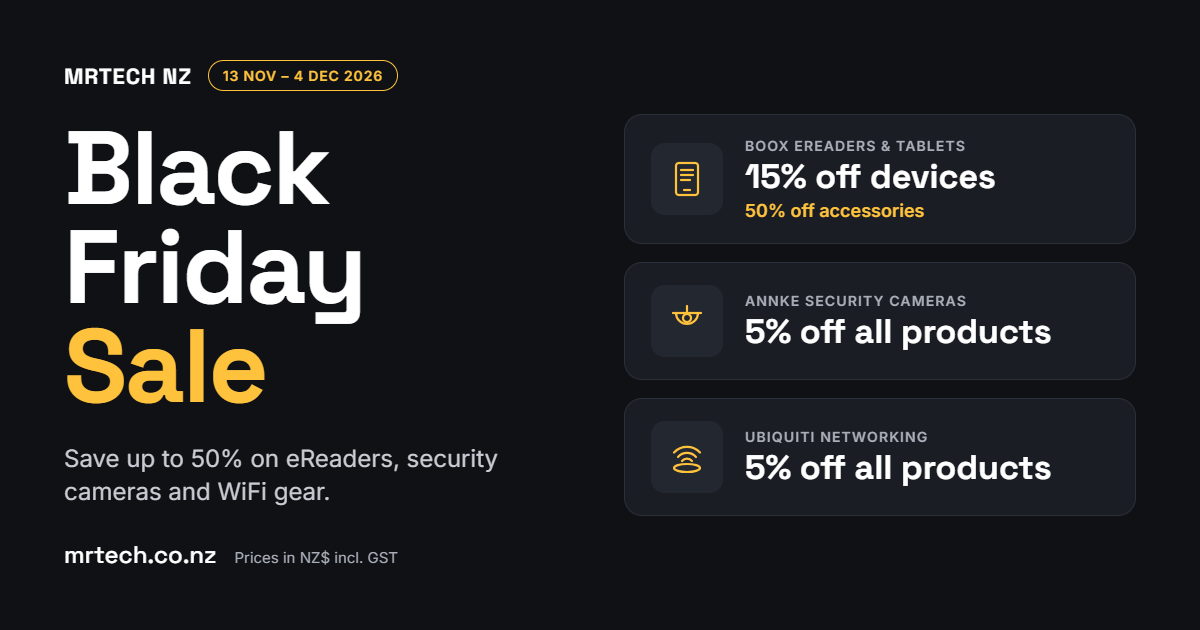
The MrTech Black Friday Sale is a good time to sort out which eReader suits you, which security cameras to trust, or how to fix patchy WiFi. From 13 November to 4 December 2026, BOOX devices are 15% off, BOOX accessories 50% off, and all ANNKE and Ubiquiti products 5% off. Here’s what each model suits and costs.
What’s in the MrTech Black Friday Sale?
The MrTech Black Friday Sale runs from 13 November to 4 December 2026. BOOX eReaders and E-Ink tablets are 15% off, and BOOX accessories are 50% off, such as the BOOX Tab Ultra C Pro Magnetic Case (Brown) at $46.99. Every ANNKE security camera and every Ubiquiti networking product is 5% off. The discounts are already applied in the prices shown on mrtech.co.nz, and all prices are in NZ$ including GST.
The sale covers three kinds of tech. E-Ink, also called ePaper, is a paper-like screen that reflects light instead of shining it at your eyes, so it’s easy to read for long sessions. PoE (Power over Ethernet) cameras get power and data through one Ethernet cable. UniFi access points sit on the ceiling and spread WiFi through the house or office.
Black Friday Prices: Which Model Suits You?
These are the Black Friday prices listed on mrtech.co.nz on 19 November 2026, in NZ$ including GST, with the discount already applied.
| Product | Key specs | Black Friday price (NZ$) | Best for |
|---|---|---|---|
| BOOX Go 6 | 6″ E Ink Carta 1300, 300 PPI, 146g, Android 11 with Google Play, 32GB plus microSD | $269.99 | Pocketable reading, holiday books |
| BOOX Palma 2 | Phone-sized 6.13″ Carta 1200 ePaper, Android 13, 6GB RAM, 128GB storage, fingerprint unlock | $409.99 | Reading on the go |
| BOOX Go Color 7 (Gen II) | 7″ Kaleido 3 colour ePaper, 4,096 colours, Android 13, InkSense stylus support, 64GB plus microSD, about 195g | $484.99 | Comics, illustrated books, highlighted documents, light note-taking |
| BOOX Note Air5 C | 10.3″ colour ePaper notebook | $884.99 | Handwritten notes and marking up PDFs |
| ANNKE AC400 | 4MP outdoor mini dome PoE camera, 2688 x 1520 at 30fps, colour night vision, human and vehicle detection, IK10 vandal-resistant, IP67-rated, built-in microphone, up to 512GB local storage | $311.58 | Driveways, front doors and entryways |
| ANNKE ACZ800 | 4K PoE outdoor camera, 4x optical zoom, 2.8–12mm motorised lens, dual-light night vision, built-in microphone, siren and strobe alarm | $442.53 | Larger yards, sheds and car parks |
| Ubiquiti U7-PRO | WiFi 7 ceiling access point, 6 spatial streams, 2.5GbE uplink, PoE+ powered, up to 140 m² coverage, 300+ connected devices, listed with a 12-month warranty | $480.00 | Fixing dead zones in a home or office |
| Ubiquiti UDR Dream Router | All-in-one WiFi 6 router | $435.00 | Replacing the ISP router at home or in a small office |
| Ubiquiti USW-16-POE | 16-port gigabit managed PoE+ switch, 8 PoE+ ports, 2 SFP (fibre) ports | $745.00 | Powering several cameras and access points from one box |
BOOX eReaders and E-Ink Tablets
If you want a Black Friday eReader NZ holidaymakers can slip into a jacket pocket, the BOOX Go 6 ($269.99) and the phone-sized Palma 2 ($409.99) both suit plain reading at the bach. For comics, highlighted documents and light notes, choose the Go Color 7 (Gen II) at $484.99, and for handwritten notes and marking up PDFs on a 10.3″ screen, choose the Note Air5 C at $884.99.
ANNKE PoE Security Cameras
Of the security camera deals NZ homeowners are weighing up, the ANNKE AC400 ($311.58) suits a driveway or front door, with colour night vision and human and vehicle detection. For a larger yard, farm shed or car park, the ACZ800 ($442.53) adds 4x optical zoom, a siren and a strobe alarm.
Ubiquiti UniFi WiFi and Networking
If WiFi drops out in the back bedroom or home office, a U7-PRO access point ($480.00) covers up to 140 m² from the ceiling, and the UDR Dream Router ($435.00) can replace the router your provider supplied. Once you’re running several cameras and access points, the USW-16-POE switch ($745.00) powers them from one box through 8 PoE+ ports.
What to Look for in Each Black Friday Deal
1. Screen Size and Colour
A 6″ or 7″ BOOX fits in a pocket and suits novels, while the 10.3″ Note Air5 C gives you room for full-page PDFs and notes. Colour Kaleido 3 screens suit comics and highlighted documents, and black-and-white Carta screens suit plain text.
2. Handwriting and Stylus Support
If you want to write as well as read, check for stylus support. The Go Color 7 (Gen II) works with the BOOX InkSense stylus, and the Note series is built for handwritten notes and marking up PDFs.
3. Camera Resolution and Night Vision
Higher resolution shows more detail: the ANNKE AC400 records at 4MP (2688 x 1520) and the ACZ800 at 4K. Both have night vision, colour on the AC400 and dual-light on the ACZ800.
4. WiFi Standard and Coverage
The Ubiquiti U7-PRO uses WiFi 7 and covers up to 140 m² with room for 300+ connected devices. The UDR Dream Router uses WiFi 6 and combines the router and WiFi in one unit.
5. Cabling and Installation
A BOOX device needs no setup beyond charging. A PoE camera or ceiling access point needs one Ethernet cable run to it, and any new power point must be installed by a licensed electrician.
Things to Consider Before You Buy
- Reading or writing: If you only read, a Go series or Palma reader from the BOOX NZ range is enough. If you take handwritten notes or mark up PDFs, look at the Note series, and see our E-Ink vs iPad for note-taking guide.
- PoE or WiFi cameras: A PoE camera keeps recording through WiFi drop-outs because one cable carries power and data, so the clip is there when the dog barks at 2am. Compare both in our PoE vs WiFi security cameras guide.
- Recording storage: An NVR (network video recorder) is the box that stores your camera footage. Work out the drive space you need with our CCTV storage guide for NZ homes.
- Camera placement and privacy: Point cameras at your own property and tell visitors and neighbours they’re there. The <a href=”https://www.privacy.org.nz/” target=”_blank” rel=”noopener”>Office of the Privacy Commissioner</a> has guidance on home CCTV.
- Patchy WiFi: A ceiling-mounted access point usually does more for the back bedroom than a plug-in extender. Our guide to fixing WiFi dead zones in your NZ home explains why.
- Rural delivery: Rural addresses can take 1–3 extra business days, so order early in the sale if it’s a Christmas present.
- Your rights: Your rights under the Consumer Guarantees Act still apply. <a href=”https://www.consumerprotection.govt.nz/” target=”_blank” rel=”noopener”>Consumer Protection NZ</a> sets out what they cover.
FAQs
What dates does the MrTech Black Friday Sale run?
13 November to 4 December 2026. BOOX devices are 15% off, BOOX accessories 50% off, and all ANNKE and Ubiquiti products 5% off, with the discounts already applied in the listed prices.
Is the 15% Black Friday discount on every BOOX device?
Yes. All BOOX eReaders and E-Ink tablets are 15% off, and BOOX accessories such as cases are 50% off until 4 December 2026.
Can a PoE security camera keep recording if my WiFi drops out?
Yes. A PoE camera gets power and data through one Ethernet cable, so recording isn’t affected by WiFi drop-outs, interference or flat batteries.
How long does delivery take in New Zealand?
1–2 business days to dispatch, then 2–7 business days. In-stock orders leave the Auckland warehouse with tracking emailed at dispatch, and rural addresses can take 1–3 extra business days.
Can I return an eReader or camera if it’s not right for me?
Yes, within 30 days of delivery. Email [email protected] first; the item must be complete and in original condition and packaging, return shipping is at your cost, and a restocking fee may apply to opened or used items.
Conclusion
In the Black Friday Sale, the BOOX Go Color 7 (Gen II) at $484.99 suits colour reading and notes, the ANNKE AC400 at $311.58 suits a driveway or front door, and the Ubiquiti U7-PRO at $480.00 suits WiFi that needs to reach the back bedroom. The sale ends on 4 December 2026, so order early if it’s going under the tree. You’ll get holiday reading that’s easy on your eyes, cameras that keep recording, and stronger WiFi in the rooms you use, and if you’re not sure what suits your place, talk to our NZ-based team about the right setup.


 No products in the cart.