
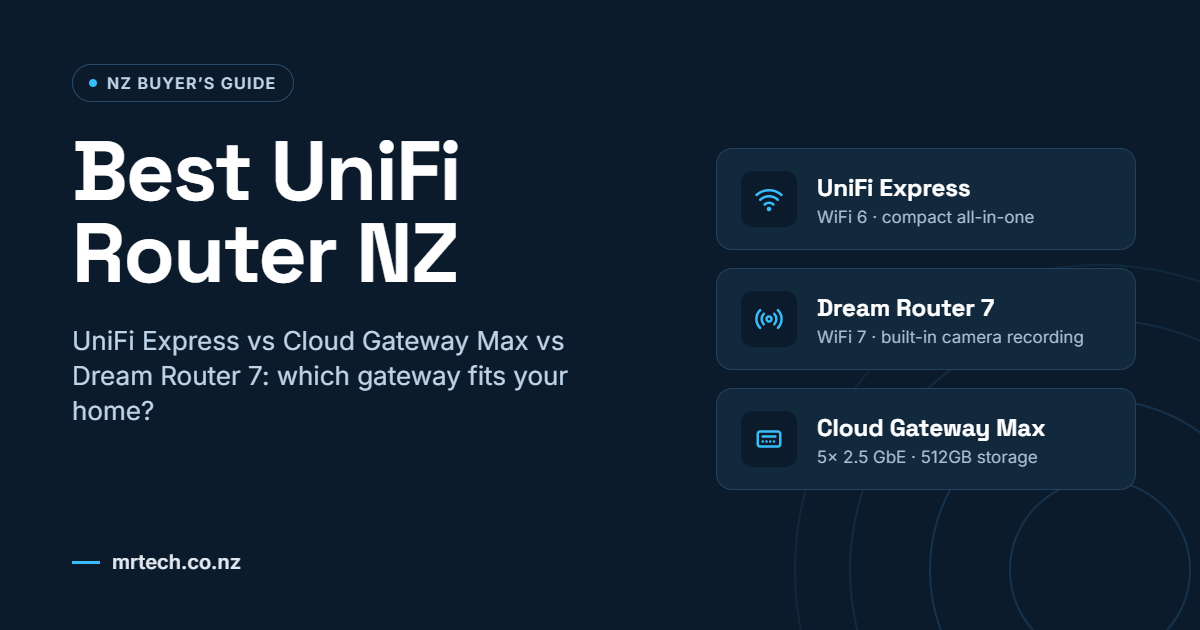
The best UniFi router NZ households should pick depends on your home, your fibre plan and how many devices you run. If your ISP router leaves wifi dead zones or bogs down when everyone’s online, a UniFi gateway lets you manage and expand your network from one app. Here’s how the UniFi Express, Cloud Gateway Max and Dream Router 7 compare.
What Is the Best UniFi Router NZ Homes Can Choose?
A UniFi router, which Ubiquiti calls a gateway, is the device that connects your home to the internet and runs your firewall and network settings. On NZ fibre, it plugs into the ONT (the small fibre box on your wall) and replaces the router supplied by your ISP, such as Spark, One NZ or 2degrees.
The best UniFi router for your situation depends on what else you need it to do. The UniFi Express adds WiFi 6 in a compact unit, the Dream Router 7 adds WiFi 7 and camera recording, and the Cloud Gateway Max adds 2.5 GbE (2.5 gigabit Ethernet) ports and 512GB of camera storage, with no built-in WiFi. You can compare all three in the UniFi routers and gateways range.
Key Benefits of a UniFi Router for Kiwi Homes
1. One App for Everything
Every UniFi gateway runs the UniFi Network app, which shows your router, wifi and connected devices on one screen. You can also set per-user speed limits and a separate guest network.
2. Room to Grow
The UniFi Express manages up to four additional UniFi devices, while the Dream Router 7 and Cloud Gateway Max each manage 30+. You can start with one box and add access points later.
3. WiFi 6 or WiFi 7 Built In
The UniFi Express has built-in WiFi 6 rated for 140 m² from a single unit. The Dream Router 7 has tri-band WiFi 7 across 2.4, 5 and 6 GHz, rated for 160 m².
4. Camera Recording Without an NVR
The Dream Router 7 and Cloud Gateway Max run UniFi Protect, so you don’t need a separate NVR (network video recorder). The Cloud Gateway Max’s 512GB NVMe SSD manages up to 15 HD, eight 2K or five 4K cameras.
5. Built-In Threat Protection
The Dream Router 7 and Cloud Gateway Max are both rated for 2.3 Gbps of IDS/IPS throughput, which is intrusion detection and prevention that blocks suspicious traffic. Both also include content filtering.
Things to Consider Before Buying
- Your fibre plan. The UniFi Express has a 1 GbE WAN port, which suits UFB plans up to 1 Gbps. For Hyperfibre plans above that, the Dream Router 7 and Cloud Gateway Max have 2.5 GbE ports.
- Floor area and walls. One UniFi Express is rated for 140 m². Multi-level homes in Wellington, and Auckland villas or brick homes with thick walls, may need extra UniFi access points.
- Number of devices. The UniFi Express is rated for 60+ WiFi devices, and the Dream Router 7 and Cloud Gateway Max for 300+ users. Count your phones, laptops, TVs and smart-home gear before you choose.
- Security cameras. For cameras at a Christchurch family home or a Hamilton café, the Dream Router 7 or Cloud Gateway Max records footage without extra hardware.
- Rural connections. On lifestyle blocks, baches and rural properties around Tauranga or Dunedin, a UniFi gateway connects to Starlink or fixed wireless equipment over Ethernet.
- Guests and home offices. UniFi supports VLANs (separate virtual networks), so Airbnb guests stay off the devices you use for remote work.
How Much Does a UniFi Router Cost in New Zealand?
At Mr Tech, the UniFi Express (UX) is $274, the entry-level option for a home on fibre up to 1 Gbps. The Dream Router 7 (UDR7) is $771 and the Cloud Gateway Max (UCG-Max) is $787, so the choice between them comes down to built-in WiFi 7 or 512GB of camera storage. For connections above 2.5 Gbps, the UCG-Fiber is $1,017.75.
FAQs
Can I replace my Spark or One NZ router with a UniFi router?
Yes. On UFB fibre a UniFi gateway plugs straight into your ONT, so ask your ISP for its connection settings, such as a VLAN tag or PPPoE login, before you switch.
Do I need extra access points with the UniFi Express?
Not always. One UniFi Express is rated for 140 m², and you can add up to four more units as mesh points if your home is larger or has thick walls.
Does the UniFi Cloud Gateway Max have built-in WiFi?
No. The Cloud Gateway Max has five 2.5 GbE wired ports but no built-in WiFi, so you add UniFi access points for wireless coverage.
Can the UniFi Dream Router 7 record security cameras?
Yes. It comes with a pre-installed 64 GB microSD card for UniFi Protect and manages up to five HD, two 2K or one 4K camera.
Can I use a UniFi router with Starlink at a bach or lifestyle block?
Yes. A UniFi gateway connects to Starlink over Ethernet, giving rural properties the same app, guest network and wifi controls as a city fibre connection.
Conclusion
The best UniFi router NZ homes should choose is the one that fits your fibre plan, floor area and device count. For a typical home on fibre up to 1 Gbps, the UniFi Express at $274 is a sensible starting point, while the Dream Router 7 or Cloud Gateway Max suit faster plans and built-in camera recording. Whichever you choose, you manage, secure and grow your whole network from one app.

 No products in the cart.