
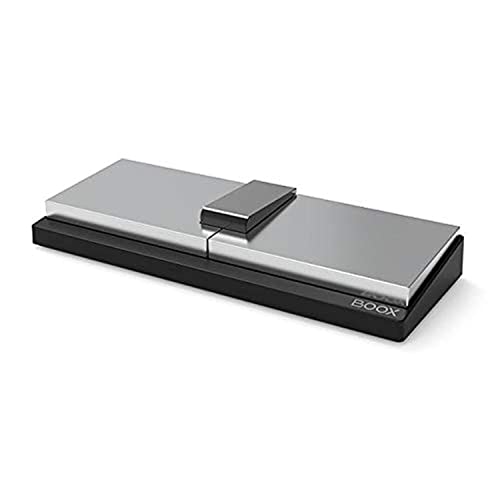
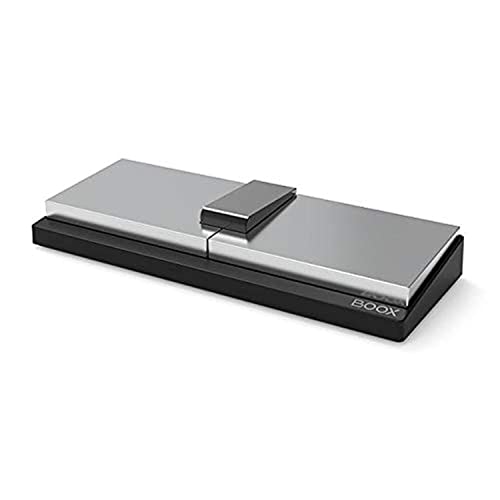
Boox Bluetooth Pedal – Quick Summary
The BOOX Blue Page Pedal is an award-winning wireless foot controller that lets you turn pages hands-free on eReaders, tablets, and apps. Ideal for musicians, presenters, and avid readers who need seamless control without using their hands.
🧾 Product Overview
The BOOX Blue Page Pedal is a Bluetooth-enabled foot controller designed to simplify how you interact with digital content. Whether you’re playing music, reading eBooks, or presenting slides, this device allows you to navigate pages effortlessly using your feet.
Recognized with the Red Dot Design Award 2019, it combines ergonomic design, strong stability, and universal compatibility with BOOX devices, Android, and iOS—making it a versatile tool for both professional and personal use.
⭐ Key Features
- Hands-Free Page Turning – Control pages without using your hands
- Bluetooth Wireless Connectivity – Quick and easy pairing
- Red Dot Award Winner (2019) – Globally recognized design excellence
- Anti-Slip Base – Stable, non-moving performance during use
- Ergonomic Foot Design – Comfortable for extended sessions
- Multiple Key Modes – Compatible with various apps and systems
- Wide Compatibility – Works with BOOX, Android, and iOS devices
✅ Benefits – Why Choose BOOX Blue Page Pedal?
- Stay focused on your task → No interruptions while playing or presenting
- Boost productivity → Faster navigation without hand movement
- Perfect for professionals → Ideal for musicians, teachers, and presenters
- Reliable and stable → Anti-slip design ensures consistent performance
- Easy to use → Quick setup with no technical complexity
👉 Unlike manual page turning, this pedal gives you full control without breaking your workflow.
🎯 Use Cases
Perfect for a wide range of real-world scenarios:
- 🎹 Musicians using digital sheet music
- 🎤 Presenters navigating slides hands-free
- 📚 Readers enjoying long sessions comfortably
- 🍳 Cooking with digital recipes
- 🧑🏫 Teachers and trainers demonstrating content
- ♿ Accessibility support for limited hand mobility
⚡ Quick Specs (Key Highlights)
- Connectivity: Bluetooth wireless
- Control: Dual foot pedals (previous/next page)
- Compatibility: BOOX devices, Android, iOS
- Modes: 4 customizable key modes
- Design: Ergonomic, anti-slip base
- Operation: Silent and responsive
- Award: Red Dot Design Award 2019
🎹 How Does the Page Pedal Work?
The pedal connects via Bluetooth to your device. Press the left pedal for the previous page and the right pedal for the next page, allowing completely hands-free navigation.
📱 Is It Compatible with Non-BOOX Devices?
Yes. It works with Android and iOS devices, as well as many reading, music, and presentation apps.
⚙️ How Easy Is Setup?
Setup is simple: turn on Bluetooth, pair the pedal, select a mode, and start using it instantly—no complicated configuration required.
❓ Frequently Asked Questions (FAQ)
Can I use the BOOX Blue Page Pedal for music sheets?
Yes, it is perfect for musicians who need to turn pages while playing instruments.
Does it work with iPhone or Android tablets?
Yes, it supports both iOS and Android devices via Bluetooth.
Is the pedal stable during use?
Yes, the anti-slip base ensures it stays firmly in place.
Can I customize the controls?
Yes, it includes multiple key modes to work with different apps.
Is it noisy when pressed?
No, it operates quietly, making it suitable for performances and quiet environments.
Is it only for reading?
No, it’s also great for presentations, cooking, studying, and accessibility use cases.
🏆 Final Verdict
The BOOX Blue Page Pedal is a smart, practical, and award-winning accessory that transforms how you interact with digital content. With hands-free control, wide compatibility, and ergonomic design, it’s a must-have for anyone who values efficiency and uninterrupted workflow.
👉 If you want seamless page navigation without using your hands, this device is a powerful and convenient solution.




 No products in the cart.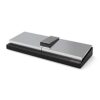
Reviews
There are no reviews yet.