
You want a tablet that works for reading, studying, notes, or light work without spending iPad money. But every “budget tablet” list is the same wall of cheap Androids that feel sluggish within six months and end up in a drawer. What if the best budget tablet isn’t the cheapest one, but the one that does its job so well you use it for years?
Best Budget Tablet NZ
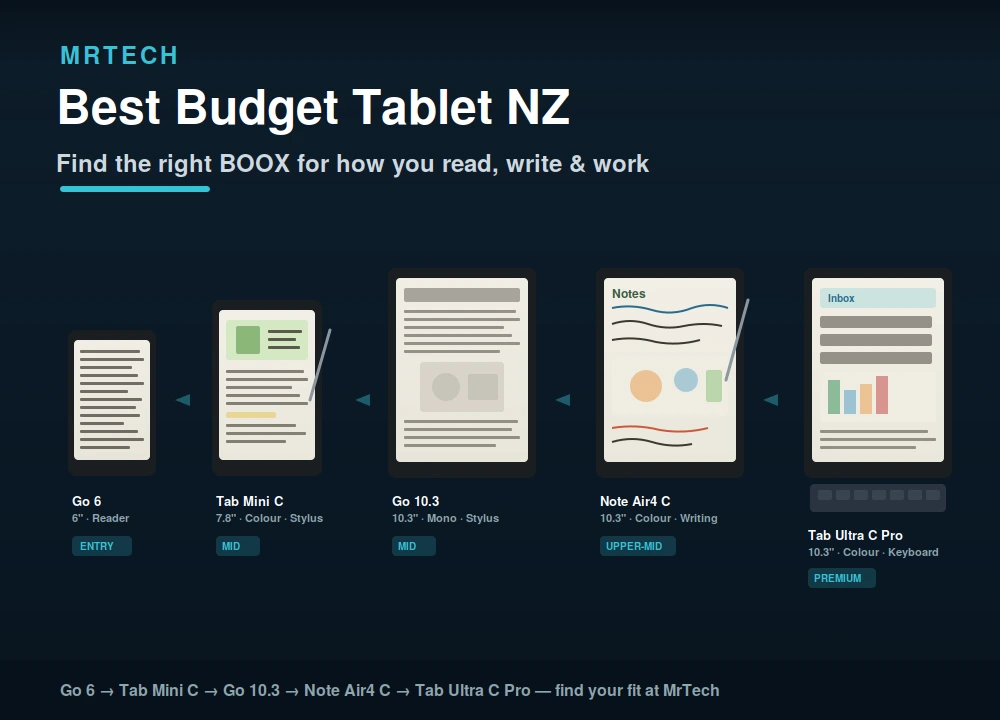
This guide takes a different approach. We’ll cover what to look for, why the cheapest sticker price often isn’t the best value, and why there’s an entire category of tablet e-ink that most NZ buyers overlook entirely. Then we’ll walk through the BOOX lineup: five models from pocket-reader to full productivity tablet, each built around eye-friendly e-paper screens that last days on a charge. If your main use is reading, writing, studying, or focused work, one of these may be the smartest tablet purchase you make.
What makes a tablet “budget” and what should you actually spend?
Budget doesn’t mean cheapest. It means best value for what you actually need. A $200 tablet that frustrates you for two years and gets replaced costs more per useful year than a $400 tablet that lasts five and does its job well every day. The real question isn’t “what’s the least I can spend?” it’s “what’s the least I can spend and still be happy with it a year from now?”
For most people reading this, the honest answer is somewhere between $200 and $600 NZD, depending on what you need the tablet to do. Below $200 you’re typically getting compromised screens, sluggish performance, and short lifespans. Above $600 you’re into premium territory. The sweet spot is a device that does its core job reading, notes, study, light productivity exceptionally well, lasts for years, and doesn’t drain your battery (or your patience) daily.
What to look for in a budget tablet in NZ
Before comparing models, know which features actually affect your daily experience and which are just spec-sheet padding.
Screen quality and eye comfort
This is the single biggest difference between a tablet you use for hours and one that gives you headaches. Traditional LCD and OLED screens emit blue light, refresh constantly, and cause eye fatigue during long reading or study sessions. E-ink (electronic paper) screens reflect ambient light like real paper — no backlight glare, no flicker, dramatically less eye strain. If your primary use is reading or writing, screen type matters more than resolution.
Battery life
LCD tablets last hours. E-ink tablets last days — often a week or more of regular use on a single charge. If you’re tired of charging every night, this alone changes how you use a tablet.
Performance and storage
For reading, notes, and light apps, you don’t need flagship specs. A decent octa-core processor, 2–6GB of RAM, and 32–128GB of storage handles everything a reader or student needs. What matters more is whether the software is optimised for the screen type and BOOX’s Android-based OS is built specifically for e-ink.
Stylus and note-taking
If you take handwritten notes for study, meetings, or journaling a stylus with pressure sensitivity on an e-ink screen feels remarkably like writing on paper. Most LCD tablets can’t replicate that feel regardless of price.
Build quality and longevity
A metal body, quality screen glass, and manufacturer firmware updates for 3+ years mean the tablet stays useful. Cheap plastic tablets with abandoned software are the false economy of the budget market.
The category most NZ buyers overlook e-ink tablets
E-ink tablets read like paper, last days on a charge, and do specific jobs better than any LCD tablet at any price. They’re not trying to replace an iPad they’re purpose-built for reading, writing, and focused work without the eye strain, notifications, and battery anxiety that come with a regular tablet.
For anyone whose main use is ebooks, PDFs, articles, note-taking, or study, an e-ink tablet isn’t a compromise it’s a better tool for the job. The trade-off is honest: e-ink screens refresh slower than LCD (no smooth video or gaming), and colour e-ink is still maturing. But for text-based work, nothing else comes close to the reading comfort and battery life.
BOOX tablets a closer look at the lineup
BOOX is the leading brand in Android-powered e-ink tablets, and they offer a range from pocket reader to full productivity device. Every model runs Android with Google Play Store access, so you’re not locked into one bookstore install Kindle, Kobo, Libby, Pocket, or any reading app you like. Here’s what each one does and who it’s for.
BOOX Go 6 the pocket-sized reader
The Go 6 is BOOX’s entry point: a 6-inch monochrome E Ink Carta 1300 screen at 300 PPI, running Android with Google Play, in a body that weighs just 146g and slips into a jacket pocket. It’s a pure reader — no stylus, no note-taking pretensions with 32GB of storage, a microSD slot, and a warm/cool front light for reading in any conditions.
Best for: budget-conscious readers who want one small device for all their ebook apps, library lending, and articles. The most affordable BOOX and the lightest way into the e-ink ecosystem.
BOOX Tab Mini C compact colour e-ink with a stylus
The Tab Mini C steps up to a 7.8-inch Kaleido 3 colour screen (300 PPI mono, 150 PPI colour), 4GB RAM, 64GB storage, and an included stylus with 4,096 levels of pressure sensitivity. It reads, it takes handwritten notes, and it shows colour content — comics, textbook diagrams, highlighted PDFs — on a screen that’s still easy on the eyes.
Best for: students and note-takers who want colour plus writing in a portable size. The sweet spot between a reader and a mini notebook.
BOOX Go 10.3 large-screen reading and writing
The Go 10.3 gives you a 10.3-inch monochrome E Ink Carta 1300 display at 300 PPI big enough for full-page PDFs, A5-sized notes, and comfortable long-form reading. Stylus support, a slim build, and the full BOOX Android experience make it a serious reading and writing tool.
Best for: PDF-heavy readers (academics, professionals, lawyers), large-format note-takers, and anyone who wants a bigger canvas without colour.
BOOX Note Air4 C colour e-ink for creatives and professionals
The Note Air4 C combines a 10.3-inch Kaleido 3 colour display with 6GB RAM, 64GB storage, Android 13, and a matte screen surface that feels like writing on paper. It’s the colour upgrade to the Go 10.3, adding illustrated content, colour annotations, and a more premium writing feel.
Best for: creatives, designers reviewing work, professionals annotating colour documents, and students with diagram-heavy coursework. The best writing feel in the lineup.
BOOX Tab Ultra C Pro the premium productivity e-ink tablet
The Tab Ultra C Pro is the top of the range: 10.3-inch Kaleido 3 colour, 6GB RAM, 128GB storage, a rear camera for document scanning, and keyboard support with a magnetic trackpad cover. Its smoother screen prioritises display clarity over matte writing feel, making it the strongest all-round productivity device in the lineup.
Best for: professionals who want an e-ink laptop replacement for reading, writing, email, and document work. The most capable BOOX, and the one that comes closest to a traditional tablet in versatility.
BOOX comparison table — which one fits your budget and use?
| Model | Screen | Size | Colour | Stylus | RAM / Storage | Best for | Price tier |
|---|---|---|---|---|---|---|---|
| Go 6 | E Ink Carta 1300 | 6″ | Mono | No | 2GB / 32GB | Pure reading, pocketable | Entry |
| Tab Mini C | Kaleido 3 | 7.8″ | Yes | Yes | 4GB / 64GB | Reading + notes, portable colour | Mid |
| Go 10.3 | E Ink Carta 1300 | 10.3″ | Mono | Yes | — | PDFs, large notes, long-form reading | Mid |
| Note Air4 C | Kaleido 3 | 10.3″ | Yes | Yes | 6GB / 64GB | Colour docs, creative work, best writing feel | Upper-mid |
| Tab Ultra C Pro | Kaleido 3 | 10.3″ | Yes | Yes | 6GB / 128GB | Full productivity, keyboard, camera | Premium |
E-ink tablet vs traditional tablet honest pros and cons
| Factor | E-ink tablet (BOOX) | Traditional tablet (LCD/OLED) |
|---|---|---|
| Eye comfort | Excellent — paper-like, no flicker | Moderate — blue light, fatigue over hours |
| Battery life | Days to weeks | Hours (charge daily) |
| Reading experience | Outstanding — sunlight readable | Good indoors, washed out in sun |
| Note-taking (with stylus) | Paper-like feel | Smooth but glassy |
| Video and streaming | Poor (slow refresh) | Excellent |
| Gaming | Not suitable | Good to excellent |
| App speed | Functional but slower refresh | Fast and fluid |
| Colour accuracy | Maturing (Kaleido 3 = 4,096 colours) | Full colour, vivid |
| Best for | Reading, writing, study, focused work | Media, gaming, general use |
The honest take: if you mainly watch video, play games, or need vivid colour, a traditional tablet is the right tool. If you mainly read, write, study, or want distraction-free focus with zero eye strain, an e-ink tablet does that job better than any LCD at any price.
Who should buy an e-ink tablet instead of a regular budget tablet?
You should seriously consider e-ink if you match any of these:
- Heavy readers — ebooks, articles, PDFs, library lending. Nothing beats e-ink for long reading sessions.
- Students — lecture notes, textbook PDFs, study materials, and a distraction-free screen that doesn’t tempt you with social media the way an iPad does.
- Note-takers and journallers — the stylus-on-e-ink writing feel is genuinely closer to paper than any LCD stylus.
- Professionals — document review, email, annotations, and focused work without screen fatigue.
- Anyone with eye strain — if regular screens give you headaches or disrupt your sleep, e-ink is a material improvement.
- Parents — a reading-focused device for kids without the YouTube/gaming rabbit hole.
FAQs
What’s the best budget tablet for reading in NZ?
For pure reading, an e-ink tablet like the BOOX Go 6 offers a better experience than any LCD tablet at any price: a paper-like screen, days of battery, and every reading app via Android. If you want colour and notes too, the Tab Mini C is the step up.
Are e-ink tablets worth it?
If your main use is reading, writing, or study, yes. The eye comfort, battery life, and paper-like feel are genuinely superior to LCD for text-based work. If you need video, gaming, or vivid colour, a traditional tablet is better suited.
Can you watch video on a BOOX tablet?
Technically yes, but the e-ink refresh rate makes video choppy. BOOX tablets are built for reading, writing, and apps not media consumption. If video matters, pair a BOOX reader with a separate screen for entertainment.
Do BOOX tablets run Android apps?
Yes. Every BOOX tablet runs Android with full Google Play Store access. Install Kindle, Kobo, Libby, Pocket, OneNote, or any app you like. The experience is optimised for e-ink, so expect some visual differences from a phone, but functionality is there.
What’s the cheapest BOOX tablet?
The BOOX Go 6 is the entry-level model and the most affordable in the range a pocket-sized monochrome e-reader with Android and Google Play.
E-ink vs iPad which is better for students?
For reading textbooks, PDFs, and taking handwritten notes with minimal distraction, an e-ink BOOX tablet is a strong choice. For multimedia coursework, video lectures, and creative apps, an iPad is more versatile. Many students benefit from both — a BOOX for study and reading, a laptop or iPad for everything else.
Where can I buy BOOX tablets in NZ?
You can browse the full BOOX e-ink range at MrTech, with NZ stock, local support, and shipping.
Find your fit
The best budget tablet isn’t always the cheapest it’s the one that does its job so well you reach for it every day. If that job is reading, writing, studying, or working without screen fatigue, a BOOX e-ink tablet is worth every dollar. Browse the BOOX tablet range at MrTech to compare models and find the one that fits your use and your budget.
 No products in the cart.