
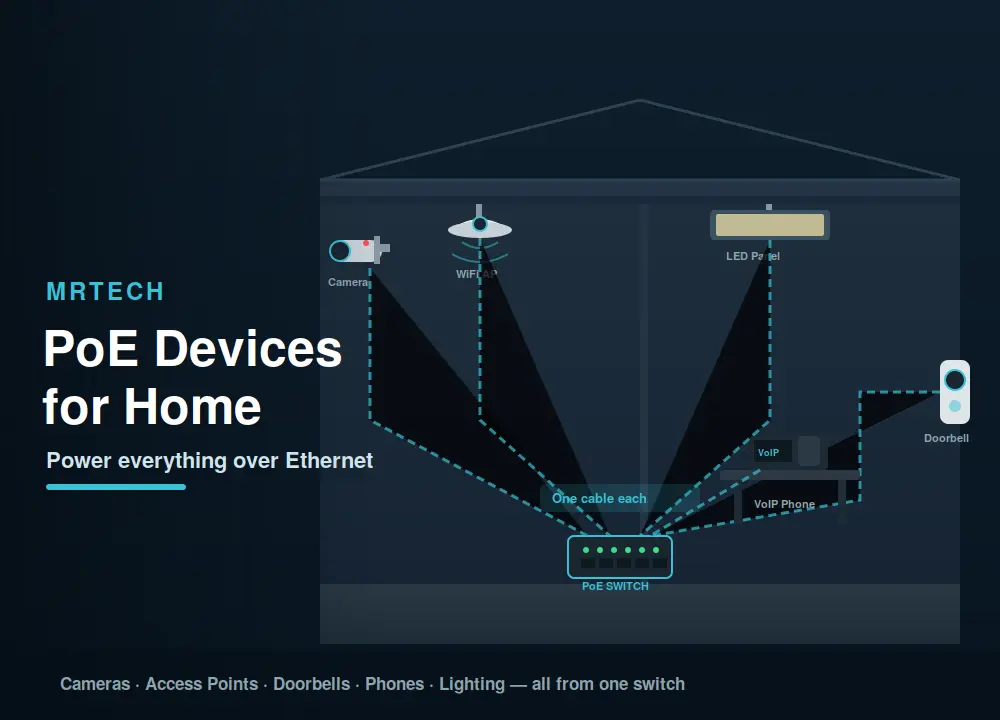
Behind every tidy smart-home setup is a mess nobody talks about: a tangle of power adapters, extension leads, and cables snaking across ceilings and down walls. Now multiply that by every camera, access point, and doorbell in the house. PoE devices for home cut that clutter in half one Ethernet cable per device carries both data and power, so you can mount gear wherever a cable reaches, no power outlet needed.
This guide covers the home devices that run on Power over Ethernet, why PoE makes a difference for each one, what you need to get started, how to plan a setup, and what it costs in New Zealand. If you’ve seen “PoE” in a spec sheet and wondered whether it’s worth it at home, here’s your answer.
What is PoE and why does it matter at home?
PoE (Power over Ethernet) delivers electrical power alongside data over a standard Ethernet cable, so a device gets its network connection and its power from a single cable. At home, that means cleaner installs, devices in spots where there’s no power outlet, and far fewer adapters cluttering your setup.
The appeal is practical, not theoretical. A security camera on the eave doesn’t need a separate power run. An access point on the ceiling doesn’t need an extension cord. A video doorbell doesn’t need a battery change every few months. One cable, one connection, done and if the power comes from a central switch, you can reboot every device on the network from one place.
What PoE devices can you use at home?
The most common PoE devices for home use are security cameras, wireless access points, video doorbells, and VoIP phones. Beyond those, PoE also powers smart lighting, sensors, and small network switches. Essentially, any low-to-mid-power device that connects to your network is a candidate.
Security cameras (indoor and outdoor)
PoE cameras are the single most popular home PoE device and for good reason. A single Ethernet cable runs from your recorder or switch to wherever the camera mounts, carrying both the video feed and the power. No separate power adapter at the camera, no battery to recharge, and no Wi-Fi dropout to worry about. Outdoor cameras benefit the most, since running a power cable to an eave, fence, or shed is often impractical, but running an Ethernet cable through a wall is straightforward.
Wireless access points
A ceiling-mounted access point gives far better Wi-Fi coverage than a router sitting on a shelf, but ceiling locations rarely have power outlets. PoE solves that: one cable from the switch, through the ceiling, and into the AP. It’s how commercial buildings have always done Wi-Fi, and it works just as well at home especially in larger NZ homes or multi-storey houses where a single router can’t cover every room.
Video doorbells and intercoms
A PoE video doorbell runs on permanent power without batteries, which means no recharging, no missed alerts from a dead battery, and usually better video quality since it doesn’t need to conserve energy. The Ethernet cable also gives a more reliable connection than Wi-Fi, which matters when the doorbell is at the far edge of your network.
VoIP phones
If you work from home or run a small office, a PoE VoIP phone is one cable to the desk data and power together, no wall adapter. It keeps the desk tidy and makes it easy to move the phone to another room.
Smart lighting and LED panels
PoE-powered LED panels and lighting fixtures are a newer category, but a practical one. They draw power from the Ethernet cable and can be controlled over the network dimmed, scheduled, or colour-adjusted from an app, without needing smart bulbs or separate controllers. Still niche at home, but growing.
Other PoE devices
The list keeps expanding: PoE-powered small switches (to extend a network to a shed or garage), environmental sensors (temperature, humidity), wall clocks, and even some thin-client computers. If it connects to a network and draws under about 70W, there’s probably a PoE version.
PoE devices vs non-PoE what’s the real difference at home?
The practical difference is cabling simplicity and placement freedom. A PoE device needs one cable; a non-PoE device needs an Ethernet cable plus a separate power source. That extra power requirement limits where you can install it and adds adapter clutter.
| Factor | PoE device | Non-PoE device |
|---|---|---|
| Cables to the device | 1 (Ethernet) | 2 (Ethernet + power) |
| Needs a power outlet nearby | No | Yes |
| Placement flexibility | High — anywhere a cable reaches | Limited by outlet location |
| Reliability | High — no Wi-Fi dropout, centralised power | Depends on Wi-Fi and individual adapters |
| Upfront cost | Slightly higher (PoE switch or injector) | Lower (but more adapters) |
| Best for | Cameras, APs, doorbells, clean installs | Simple setups, close to outlets |
For one or two devices close to a power outlet, PoE may not be necessary. For three or more devices — especially in hard-to-reach spots PoE pays for itself in cleaner cabling and fewer headaches.
What do you need to run PoE devices at home?
You need two things: a PoE device and a power source either a PoE switch (which has PoE built into its ports) or a PoE power injector added to your existing non-PoE switch. The device plugs in via Ethernet and receives both data and power through that cable. That’s the whole setup.
PoE switch vs power injector quick decision guide
- PoE switch — replaces your existing switch and provides PoE on some or all ports. Best when you have 3+ PoE devices. Cleaner, one box handles everything.
- Power injector — a small inline device that adds PoE to a single Ethernet cable. Best for 1–2 devices when you don’t want to replace your switch. Cheap and simple.
If you are just adding one camera, an injector is the fastest, cheapest path. If you are wiring up cameras, an AP, and a doorbell, a PoE switch saves you from stacking injectors. For a deeper look at injectors, see our guide to Ethernet power injectors.
PoE standards: matching device to power source
PoE comes in standards that set how much power the cable delivers. Your power source must meet or exceed what the device needs.
| Standard | Common name | Max power to device | Typical home devices |
|---|---|---|---|
| 802.3af | PoE | ~13W | VoIP phones, basic cameras, sensors |
| 802.3at | PoE+ | ~25W | HD/4K cameras, high-power APs, doorbells |
| 802.3bt | PoE++ | ~51–71W | PTZ cameras, LED panels, thin clients |
Most home PoE devices run on 802.3af or 802.3at. Check your device’s spec sheet and make sure the switch or injector matches.
How to plan a PoE setup for your home
Start with the devices you want to power, then work backward to the switch or injectors you need. It’s simpler than it sounds four steps covers most homes.
- List your PoE devices — which cameras, APs, doorbells, or phones you want to run on PoE
- Check each device’s PoE standard and wattage — from its spec sheet or product page
- Add up total wattage — this is your “PoE budget,” which your switch needs to supply
- Decide: PoE switch or injectors — 1–2 devices = injectors; 3+ devices = switch
- Plan cable runs — Ethernet works up to 100 metres; keep outdoor runs protected and consider surge protection
How much does a home PoE setup cost in NZ?
A basic home PoE setup starts from a few hundred dollars for a single injector and camera, scales into the low thousands for a multi-device system with a PoE switch, and rises further for a full smart-home PoE install. The devices themselves often cost only slightly more than their non-PoE equivalents the main variable is the switch.
| Setup | What’s included | Typical cost (NZD) |
|---|---|---|
| Starter (1–2 devices) | 1–2 injectors + PoE camera or AP | ~$150–$400 |
| Mid (3–5 devices) | 8-port PoE switch + cameras + AP | ~$500–$1,500 |
| Full home (6+ devices) | 16-port PoE switch + cameras + APs + doorbell | ~$1,500–$3,500+ |
The cost comparison that matters: add up what you’d spend on individual power adapters, extension leads, and the electrician’s time to run power to each device location PoE often comes out similar or cheaper once you factor that in.
Pros and cons of PoE at home
Pros:
- One cable per device — cleaner installs, less clutter
- Mount devices anywhere a cable reaches — no outlet needed
- Centralised power — reboot or manage devices from one switch
- More reliable than Wi-Fi for cameras and APs
- Scales easily — add a device by running one more cable
Cons:
- Upfront cost for a PoE switch or injectors
- Cable runs needed (less convenient than purely wireless)
- 100-metre cable limit per run
- Overkill if you only have one or two devices near existing outlets
- Outdoor runs need surge protection
Common mistakes to avoid
- Wrong PoE standard — buying an 802.3af switch for a device that needs 802.3at leaves it underpowered or dead
- Undersized switch wattage budget — a switch may have PoE ports but not enough total wattage to power all of them simultaneously at full draw
- Running cables beyond 100 metres — that’s the Ethernet limit; beyond it, you need a PoE extender
- No surge protection on outdoor runs — exposed cables are vulnerable to lightning and static, especially in storm-prone NZ areas
- Passive PoE on a standards-based device — or vice versa; mismatching can damage equipment
- Overcomplicating it — if you have one camera next to a power outlet, you probably don’t need PoE for that device
FAQs
What devices use PoE at home?
The most common are security cameras (indoor and outdoor), wireless access points, video doorbells, and VoIP phones. PoE also powers smart LED panels, sensors, and small network switches essentially any networked device that draws under about 70W.
Do I need a special switch for PoE?
You need either a PoE switch (with PoE built into its ports) or a PoE power injector added to your existing switch. A PoE switch is the cleaner option for three or more devices; an injector is simpler for one or two.
Can I add PoE to my existing network?
Yes. A PoE injector sits inline between your current switch and the device, adding power to that single cable without replacing any existing gear. It’s the quickest way to add PoE to one or two devices.
Is PoE worth it for a home setup?
If you have three or more devices in spots without convenient power outlets cameras, an AP, a doorbell PoE is usually worth it for the cleaner install and better reliability. For one device next to a plug, it’s less essential.
How many PoE devices can I run?
That depends on your switch’s total PoE wattage budget. An 8-port PoE switch might supply 60–150W total, which could power 4–8 typical cameras or APs. Check the switch’s total PoE budget against the combined wattage of your devices.
Do PoE cameras need a separate power supply?
No, that’s the whole point. A PoE camera draws its power from the Ethernet cable, so it doesn’t need a separate power adapter or a nearby outlet.
How far can PoE run?
Standard PoE works up to 100 metres over Ethernet cable. Beyond that distance, you’d need a PoE extender to reach the device.
Ready to tidy up your home network?
PoE turns a messy multi-adapter setup into a clean, one-cable-per-device network and once you have run PoE cameras and an AP, you’ll wonder why you didn’t do it sooner. Browse the PoE devices, switches, and networking gear at MrTech, or get in touch and we’ll help you plan a PoE setup that fits your home.
 No products in the cart.