
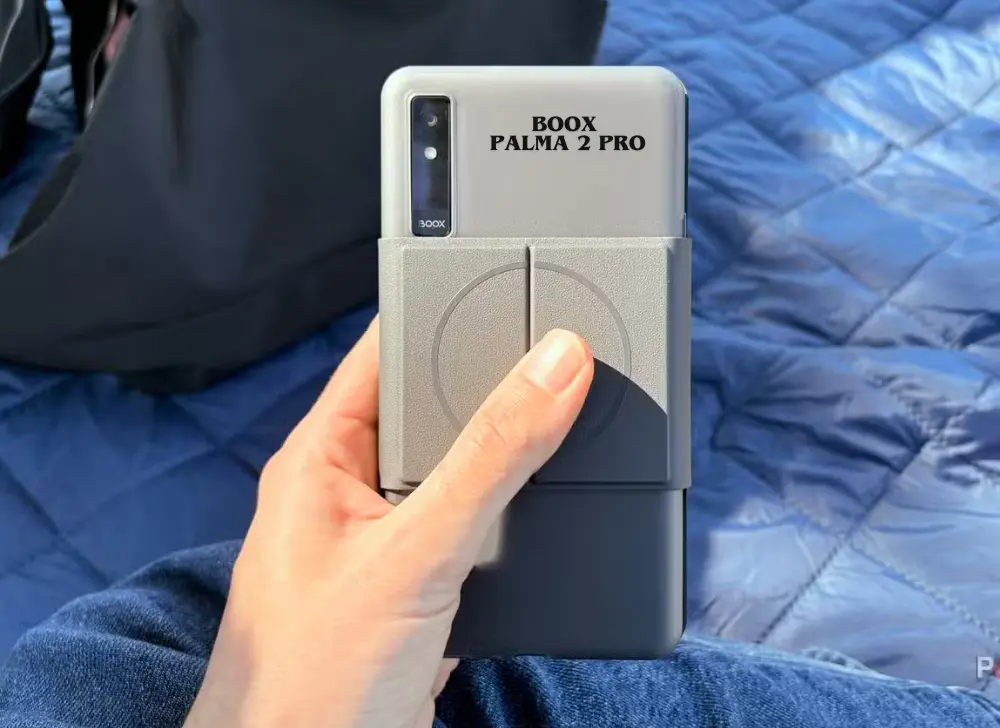
Your phone is the problem. You pick it up to read one chapter and surface forty minutes later in someone’s comment section. The Boox Palma 2 Pro exists to fix exactly that a phone-sized E Ink device that runs your reading apps, fits in the same pocket, and offers precisely nothing worth doomscrolling. If you’re weighing up the Boox Palma 2 Pro in NZ against the cheaper Palma 2 or wondering whether a pocket e-reader can really replace your phone for reading here’s the full picture, including what the “Pro” price jump actually buys you.
What is the Boox Palma 2 Pro?
The Boox Palma 2 Pro is a 6.13-inch colour E Ink device the size of a smartphone, running Android 15 with full Google Play access. Released in November 2025, it adds a Kaleido 3 colour screen, a 5G data SIM slot, 8GB of RAM, and stylus support over the standard Palma 2 at a noticeably higher price.
Think of it as the point where the Palma line stopped being a quirky “E Ink phone” novelty and became a genuinely capable pocket computer for readers. It measures 159 × 80 × 8.8 mm and weighs just 175 grams lighter than almost any current smartphone with a fingerprint reader in the power button, a customisable smart button, volume keys that double as page-turners, and a USB-C port that handles charging, data, and audio.
Because it runs proper Android with the Play Store, you’re not locked into anyone’s bookstore. Kindle, Kobo, Libby, Pocket, OneNote, Audible they all install and run. That single fact is why the Palma family outsells every device that has tried to copy it.
What’s new vs the Boox Palma 2
The short version: the Pro adds colour, cellular data, double the RAM, a newer Android, and pen support. The standard Palma 2 remains a black-and-white, Wi-Fi-only reader. Whether the upgrades justify the gap depends entirely on how you’ll use it so here’s each one with the honest fine print.
Kaleido 3 colour screen with a trade-off you should know about
The Pro swaps the mono panel for E Ink Kaleido 3. Black-and-white text stays crisp at 300 PPI, while colour renders at 150 PPI — fine for comic panels, book covers, highlighted PDFs, and charts, but soft and muted next to a phone screen. Nobody should expect LCD colour; that’s not what this technology is.
The honest trade-off: Kaleido 3 panels have a darker base canvas than mono E Ink, so you’ll use the front light more often, even in decent room lighting. The light is excellent adjustable between cool and warm — but if you exclusively read novels in black and white, the standard Palma 2’s brighter mono screen is arguably better for you, and cheaper.
5G data SIM and A-GPS — connected without the noise
This is the sleeper feature. A hybrid SIM tray takes a data-only SIM, so the Palma 2 Pro stays online for syncing, downloads, Spotify, podcasts, and messaging apps like WhatsApp anywhere, without tethering to your phone.
Two limits to be clear about: it’s data only no cellular voice calls or SMS and there’s no NFC, so it won’t replace your phone for payments. A-GPS is on board, though, so maps and fitness tracking work. For a lot of buyers, this combination is the whole pitch: connected enough to be useful, limited enough to stay calm.
Snapdragon 750G, 8GB RAM, Android 15
Under the plastic shell sits a Snapdragon 750G, 8GB of RAM, and 128GB of storage comfortably the strongest hardware in any pocket e-reader. Paired with Boox Super Refresh (BSR), which lets you set faster refresh modes per app, third-party Android apps run about as smoothly as E Ink physics allows.
Android 15 matters more than it sounds. Previous Boox devices shipped on ageing Android versions; 15 gives this device years of app compatibility headroom, which is exactly what you want from a $NZD-serious purchase you plan to keep.
InkSense Plus stylus support — handy, within reason
The Pro works with Boox’s InkSense Plus stylus (sold separately, roughly NZ$85–95 landed) for quick notes, annotations, and to-dos in Boox Notes or OneNote. Writing latency is acceptable and handwriting capture is accurate.
Keep expectations sized to the hardware: this is a 6.13-inch screen. It’s a memo pad, not a notebook. If handwritten note-taking is a primary use case, a Boox Go 10.3 or Note Air is the right tool — the Palma’s pen support is for capturing thoughts on the move, and at that job it’s genuinely useful.
Palma 2 Pro vs Palma 2 vs original Palma
| Feature | Palma 2 Pro (2025) | Palma 2 (2024) | Palma (2023) |
|---|---|---|---|
| Screen | 6.13″ Kaleido 3 colour | 6.13″ Carta 1200 mono | 6.13″ Carta 1200 mono |
| Text / colour resolution | 300 PPI / 150 PPI | 300 PPI / — | 300 PPI / — |
| OS | Android 15 | Android 13 | Android 11 |
| RAM / storage | 8GB / 128GB | 6GB / 128GB | 6GB / 128GB |
| Cellular data | 5G data SIM (hybrid tray) | None (Wi-Fi only) | None (Wi-Fi only) |
| Stylus support | InkSense Plus | No | No |
| Fingerprint reader | Yes | Yes | No |
| Expandable storage | microSD up to 2TB | microSD | microSD |
| Battery | 3,950 mAh | 3,950 mAh | 3,950 mAh |
| Weight | 175 g | ~170 g | 170 g |
The upgrade maths: from an original Palma, the Pro is a big jump on every axis. From a Palma 2, upgrade only if colour, cellular data, or the stylus solves a real problem for you the core reading experience hasn’t changed much, and for pure novel-readers the Palma 2 remains the value pick.
Using the Palma 2 Pro in New Zealand
Practical NZ notes, because most reviews online are written for the US market:
- Data SIM options. The hybrid tray takes any NZ data-only SIM or eSIM-alternative prepay data plan. A low-cost data plan from One NZ, Spark, or a budget MVNO covers syncing and audio streaming easily — this device sips data compared with a phone. [E-E-A-T placeholder: which NZ network/SIM you tested in-store and real-world coverage experience.]
- Library borrowing works. Install Libby, sign in with your NZ library card, and borrow ebooks and audiobooks free. Kindle NZ and Kobo NZ apps both run properly, so existing libraries carry over.
- Storage for the whole library. The hybrid tray takes either two SIMs or a SIM plus microSD (up to 2TB). For NZ users, the sensible configuration is one data SIM plus a microSD card.
- In the box. The Pro ships with Boox’s magnetic 2-in-1 protective case a slim clear shell plus detachable flip cover so there’s no mandatory accessory spend beyond the optional stylus.
How much does the Boox Palma 2 Pro cost in NZ?
The Palma 2 Pro launched at US$399, which lands in New Zealand around the NZ$749–$799 mark once GST and freight are accounted for roughly NZ$150–200 above the standard Palma 2. [E-E-A-T placeholder: replace with your current retail price and any bundle offer.]
That positions it against mainstream 7-inch e-readers at the top of the market and well above a basic Kindle. The premium buys the open Android ecosystem, colour, cellular data, and hardware that nothing else in the pocket category matches. Whether that’s worth it comes down to the next section.
Who should buy the Palma 2 Pro and who shouldn’t
Buy it if you:
- Read on your phone now and want the habit without the distractions this is the single best device made for that exact problem
- Commute, travel, or read away from Wi-Fi, where the data SIM earns its keep
- Read comics, manga, magazines, or annotated PDFs where colour genuinely helps
- Want one pocket device for ebooks, library loans, audiobooks, and podcasts across any app or store
- Like jotting quick notes and to-dos with a pen
Skip it if you:
- Read almost exclusively black-and-white novels the standard Palma 2 is cheaper and its mono screen is brighter
- Want a primary note-taking device get a 10.3″ Boox instead
- Expect phone replacement — no calls, no SMS, no NFC payments
- Are price-sensitive and new to E Ink — start cheaper and learn what you actually use
The clear expert take: the Palma 2 Pro is the most complete pocket E Ink device ever sold, but it’s a reader-first device with smart extras — not a small tablet, and not a phone. Buy it for what it is and it’s superb.
FAQs
Is the Boox Palma 2 Pro worth it over the Palma 2?
If you’ll use the colour screen, cellular data SIM, or stylus, yes — those are real upgrades along with 8GB RAM and Android 15. If you only read black-and-white novels on Wi-Fi, the standard Palma 2 delivers the same core experience for meaningfully less.
Can the Palma 2 Pro make phone calls?
Not cellular ones — the SIM slot is data-only, with no voice calls or SMS. You can, however, use internet-based calling and messaging apps like WhatsApp over data or Wi-Fi.
Does the Boox Palma 2 Pro have a colour screen?
Yes — an E Ink Kaleido 3 panel showing 4,096 colours at 150 PPI, while black-and-white text renders at a sharp 300 PPI. Colours look soft and paper-like rather than vivid, which suits comics, covers, and documents.
Does Kindle work on the Boox Palma 2 Pro?
Yes. It runs Android 15 with full Google Play access, so the Kindle app installs and works normally as do Kobo, Libby, Audible, Pocket, and essentially any Android reading app.
How long does the battery last?
The 3,950 mAh battery typically delivers several days of regular reading, or around a full day of heavy mixed use with the front light and data connection active. E Ink only draws meaningful power when the screen changes, so reading is very efficient.
Where can I buy the Boox Palma 2 Pro in NZ?
Through NZ-based BOOX retailers buying locally gets you NZ consumer-law protection and local warranty support rather than dealing with an overseas seller. eReaders NZ stocks the current BOOX range with NZ support.
 No products in the cart.