
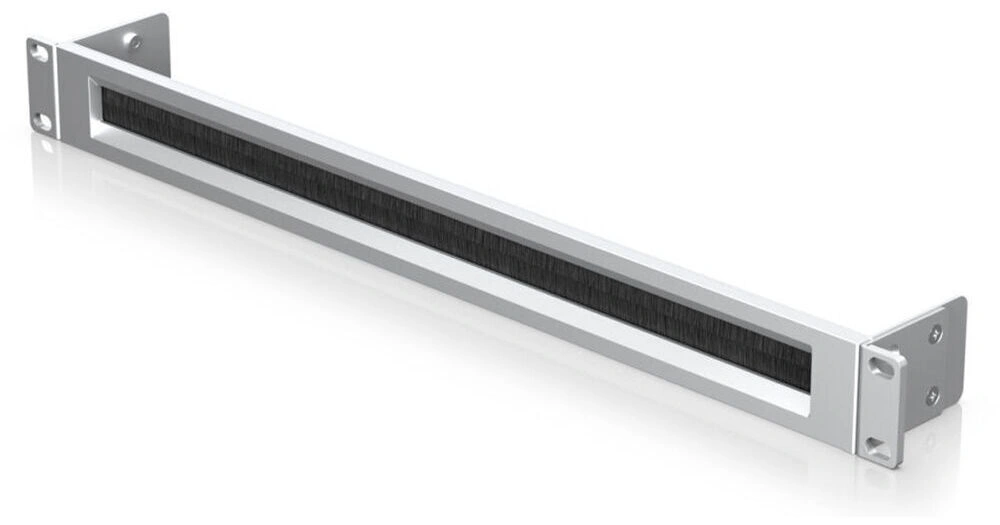
UniFi Rack Mount OCD Brush Panel – 1U Cable Management That Lives Up to Its Name
Ubiquiti didn’t call it the OCD panel by accident. If the sight of cables spilling out of an open rack space bothers you and if you’re reading this, it does the UniFi Rack Mount OCD Brush Panel is the fix: a 1U, 19-inch brush panel that lets every cable pass through cleanly while hiding the chaos behind a wall of dense nylon bristles.
The result is a rack that looks like it was installed by a professional, keeps dust out, and lets air move the way your equipment needs it to.
Why Your Rack Needs a Brush Panel
An open 1U gap does three bad things at once: it lets dust in, it lets cooling air short-circuit past your equipment, and it turns your cable runs into a visible tangle. A brush panel closes the gap without blocking access cables slide through the bristles anywhere along the panel, no grommets, no cutting, no planning required.
Key Features
1. Clean Cable Pass-Through, Anywhere on the Panel
Route patch leads, power cords, and fibre through the brush at any point. The bristles part around each cable and close behind it, so ten cables look as tidy as one. Adding or removing a run later takes seconds no unscrewing anything.
2. Dust Protection for Everything Behind It
The high-density nylon bristles act as a barrier against dust and debris entering the rack the same dust that coats fans, clogs heatsinks, and quietly shortens hardware life. Less dust in means less cleaning and fewer thermal surprises.
3. Better Airflow Management
Open rack spaces let hot and cold air mix, undermining your cooling. Blanking the gap with a brush panel keeps airflow moving front-to-back through your equipment instead of recirculating around it a small change that makes a measurable difference in packed racks.
4. Universal 19″ Fit — Not Just for UniFi
It carries the UniFi name and pairs perfectly with a UniFi Dream Machine, switches, and patch panels — but it’s a standard 1U, 19-inch panel. It mounts in any EIA-standard rack alongside Cisco, MikroTik, Netgear, TP-Link, or anything else you’re running.
5. Built Like the Rest of Your Rack Gear
A rigid metal frame with a clean black finish that matches UniFi rack equipment, and bristles that flex without fraying through years of cable changes.
Installation in Under a Minute
- Pick your 1U space typically between your patch panel and switch, or wherever cables enter the rack.
- Secure it with standard rack screws or cage nuts.
- Feed your cables through the brush. Done.
Where It Earns Its Keep
- UniFi home labs and homelabs generally — the finishing touch that makes the rack photo-worthy
- Office comms cabinets — tidy racks are easier (and cheaper) for the next technician to work on
- Data centres and server rooms — dust control and airflow discipline at scale
- AV, studio, and broadcast racks — constant recabling is exactly what brush pass-through is for
FAQs
Q: Does it only work with UniFi equipment?
A: No, it’s a standard 1U, 19-inch panel that fits any EIA-standard rack or cabinet, whatever brand of gear is inside.
Q: How many cables fit through the brush?
A: Practically, dozens the bristles part around each cable individually across the full width of the panel, from slim patch leads to thicker power cords.
Q: Does it help with cooling?
A: Yes. Closing open rack spaces stops hot exhaust air recirculating to equipment intakes, and the bristles block dust that would otherwise build up on fans and heatsinks.
Q: Is mounting hardware included?
A: It mounts with standard rack screws or cage nuts the same hardware used throughout your rack. Check what’s supplied with your specific rack or order screws alongside if unsure.
Q: Can I still add or remove cables after installation?
A: Easily that’s the point of a brush panel over a solid blank. Push a new cable through anywhere on the panel, or pull one out, without touching a screwdriver.

 No products in the cart.
Reviews
There are no reviews yet.